- Convert PST to PDF with attachments while preserving original data integrity.
- Batch convert multiple PST files to PDF in one go to save time and effort.
- Convert PST to PDF without installing Microsoft Outlook.
Explore features, speed, and reliability that make it a top-rated tool.
BreviSoft PST to PST Converter, powered with advanced conversion technology, ensures 100% data accuracy while processing Outlook files. When used alongside an Outlook PST to PDF Converter workflow, it preserves email formatting, attachments, metadata, timestamps, and original folder hierarchy without any alteration. This level of precision is essential for compliance, legal documentation, and secure archiving. Users can confidently manage and convert Outlook data knowing that every detail remains intact and professionally structured.
The BreviSoft PST to PST Converter is built to handle large-scale data operations efficiently, making it an ideal companion for Outlook PST to PDF Converter tasks. It supports bulk file processing and allows users to apply smart filters such as date range, sender, subject, or specific folders. This helps export only relevant mailbox data, reduces manual workload, and improves productivity. The advanced filtering and batch capabilities make it perfect for businesses managing large Outlook archives.
Designed for flexibility and reliability, the BreviSoft PST to PST Converter works independently without requiring Microsoft Outlook installation, ensuring smooth performance across systems. It supports ANSI and Unicode PST files, large mailboxes, and password-protected data, making it highly compatible with all Outlook versions. When used in combination with an Outlook PST to PDF Converter, it delivers secure, stable, and seamless data handling, even for complex or oversized PST environments.
Best Solutions to Convert PST emails to PDF with attachments, batch export, and smart filters

The BreviSoft PST to PDF Converter allows you to convert PST files into PDF format without installing Microsoft Outlook. This powerful Outlook to PDF Converter works independently, saving system resources and time. It securely processes mailbox data while preserving original structure and formatting, making Outlook email conversion fast, simple, and reliable.

Easily export only the mailbox data you need using advanced filtering options. This smart Outlook to PDF Converter lets you select emails by date range, folder, subject, or sender. As an efficient Outlook Email to PDF Converter, it helps reduce clutter, improve organization, and streamline PST to PDF conversion with precision.

Convert Outlook emails along with their attachments while maintaining original data integrity. This advanced Outlook to PDF Converter allows attachments to be embedded or converted into PDF pages. It ensures complete and accurate email records, making it ideal for professional documentation, secure archiving, and long-term data preservation.

Handle large-scale email conversion effortlessly with batch processing. This high-performance Outlook Email to PDF Converter enables users to convert multiple PST files into PDF simultaneously without compromising accuracy. It is an ideal solution for professionals and businesses managing large Outlook mailbox archives efficiently.

Organize converted files easily with multiple customizable naming formats. This intelligent Outlook to PDF Converter allows naming based on subject, date, sender, or other attributes. It helps maintain structured storage and makes managing, searching, and retrieving PDF files much more convenient.

The software supports ANSI and Unicode PST files from all Outlook versions, including large and complex mailboxes. This reliable Outlook Email to PDF Converter ensures smooth performance across different environments, making it suitable for both personal users and enterprise-level data conversion needs.

Customize the final PDF output by choosing whether to include or exclude email headers. This flexible Outlook to PDF Converter helps meet privacy, formatting, or documentation requirements, giving users full control over how converted emails appear in the final PDF files.

Designed for flexibility, the tool supports diverse output needs beyond basic conversion. This professional Outlook Email to PDF Converter ensures smooth handling of mailbox data for archiving, sharing, and long-term management, making it a versatile solution for different email conversion requirements.
Ensure your system meets all software and hardware requirements for a smooth PST conversion experience
Trial Limitations
Limitations
The trial version of BreviSoft Outlook PST Converter allows users to convert and save the first 50 items from each PST folder, providing a risk-free way to test all features.
System Specifications
Hard Disk Space
1000 MB of free hard disk space required
RAM
4 GB is recommended
Processor
Intel®Core™ 2 Duo CPUE 4600@ 2.40GHz 2.39GHz
Application
Pre-Requisites
Run the tool as Standard/Guest User without asking for admin privilege:
Supported Editions
FAQs
Electronic Delivery
Our delivery process is automated. Once your payment is confirmed, you will receive an email containing both your download link and activation key within a few minutes.
Compare the features available in the Free and Pro editions before converting PST files to PDF
| Features | Demo Version | Full Version |
|---|---|---|
| Add PST Files (Dual Selection Options) | ||
| Convert Selected Items from Full Mailbox | ||
| Advanced Filter Settings | ||
| Auto-Load PST from Configured Outlook Profile | ||
| PST to PDF Conversion | First 50 items only | All items (Unlimited) |
| Cost | Free | $29 |
Trusted and recognized software backed by industry awards and reviews.

BreviSoft Outlook to PDF Converter has gained strong recognition on Softonic for its user-friendly interface, reliable performance, and efficient PST to PDF conversion capabilities. The platform highlights its smooth functionality, advanced features, and consistent results. Softonic’s positive acknowledgment reflects the software’s ability to meet modern email conversion needs with speed, accuracy, and dependable usability.

BreviSoft PST to PDF Converter is widely appreciated on CNET for delivering secure, accurate, and professional Outlook data conversion. It is recognized for preserving email formatting, handling attachments efficiently, and supporting bulk PST processing. CNET’s recognition emphasizes the software’s reliability, performance stability, and practical value for both individual users and business environments managing large Outlook data.

Software Informer recognizes BreviSoft Outlook PST to PDF Converter for its advanced functionality, seamless processing, and comprehensive PST handling features. The platform highlights its ability to manage large files, maintain data integrity, and provide flexible conversion options. This appreciation reflects the tool’s strong technical performance and effectiveness as a dependable solution for professional email archiving and management.
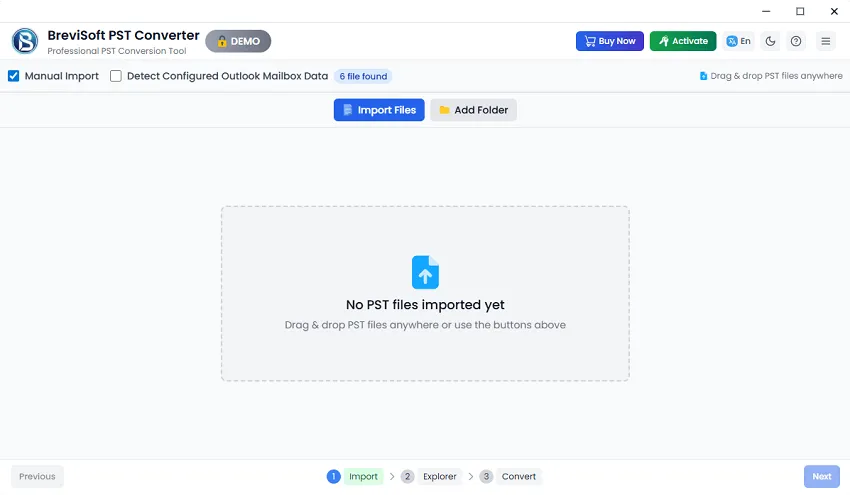
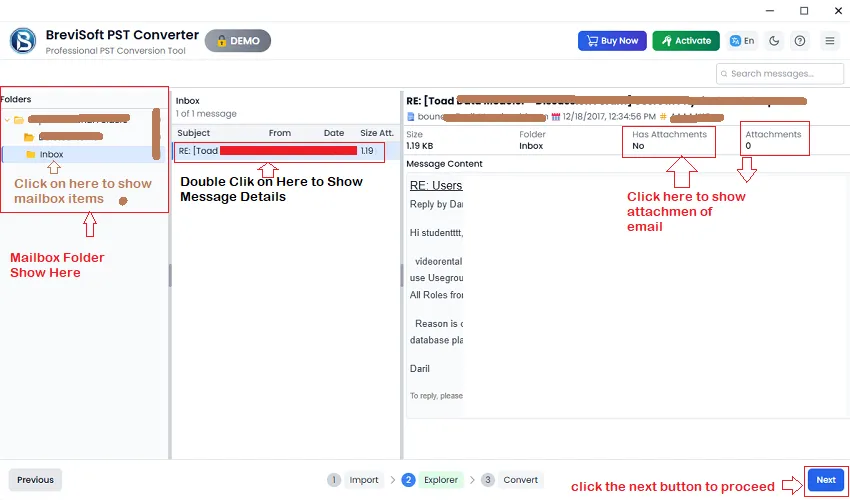
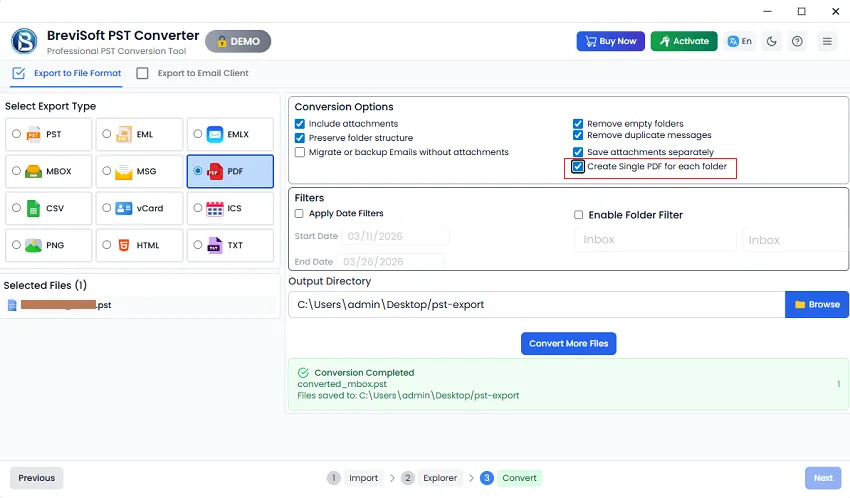
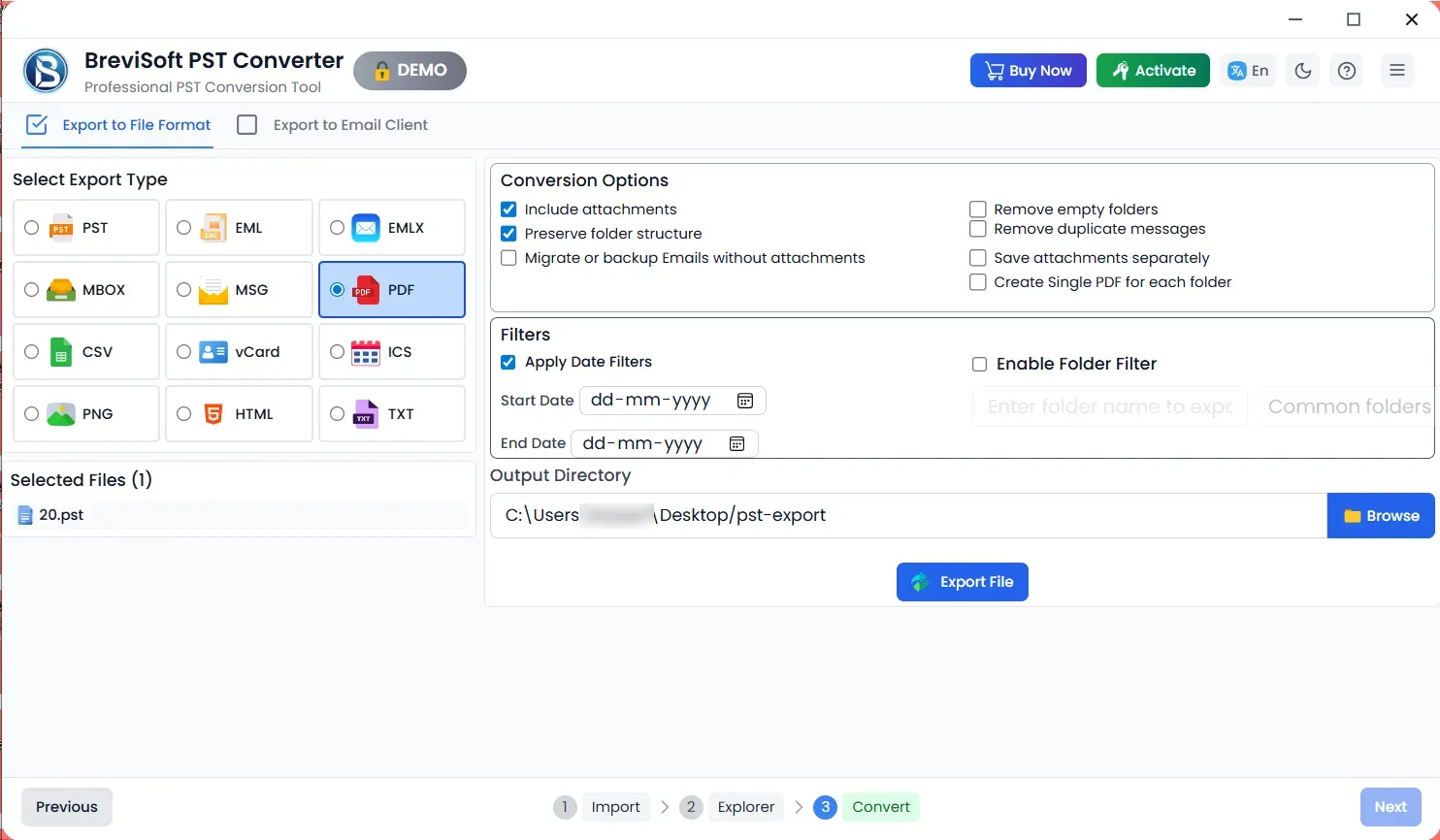
Follow these simple steps using BreviSoft PST to PDF Converter on Windows:
Yes. BreviSoft PST to PDF Converter can convert Outlook contacts into Adobe PDF format along with other mailbox items.
No. The software supports converting PST files of any size, including large Outlook data files.
Yes. The tool converts emails along with attachments while preserving formatting and folder hierarchy, making it ideal for archiving and sharing.
You can open PST files without Outlook using this converter. It extracts emails, contacts, calendars, folders, and attachments for viewing and conversion. You may also use a free PST viewer for direct access.
Yes. The software offers multiple naming options such as Subject + Date, From + Subject + Date, Date + From + Subject, and more for organized file management.
Black & White Mode converts emails into grayscale PDFs, reducing file size. It is useful for printing or archiving when color and text recognition are not required.
Yes. The tool can recover data from damaged, oversized, or inaccessible PST files and convert emails and attachments to PDF without data loss.
Yes. The original folder hierarchy is maintained, making it easy to navigate converted email data.
No. BreviSoft PST to PDF Converter works independently and does not require Outlook. It can extract and convert data from PST and similar mailbox archives directly into PDF format.
Know What Our Clients Say About Outlook PST to PDF Conversion Program
We were searching for the best PST to PDF converter to archive large volumes of Outlook data for compliance purposes, and BreviSoft exceeded expectations. The software handled batch conversion smoothly and preserved attachments and folder structure perfectly. As an Outlook PST to PDF conversion program, it’s reliable, fast, and extremely easy to use. Highly recommended for business environments.
BreviSoft is honestly the best PST to PDF converter we’ve used in our law office. We needed accurate email records for documentation, and this Outlook PST to PDF conversion program preserved formatting, timestamps, and attachments exactly. The filtering options saved us hours of manual work. It’s dependable, secure, and ideal for professional email archiving and sharing.
After testing several tools, we chose BreviSoft because it truly performs like the best PST to PDF converter available. The batch processing feature is incredibly efficient, and we didn’t even need Outlook installed. This Outlook PST to PDF conversion program works flawlessly with large PST files and delivers consistent results. It’s now part of our regular data management workflow.
I needed a simple but powerful solution to convert years of Outlook emails into PDF, and BreviSoft delivered exactly that. It’s easily the best PST to PDF converter I’ve tried. The interface is clean, the conversion is fast, and every email is preserved accurately. This Outlook PST to PDF conversion program makes archiving and sharing emails incredibly easy.