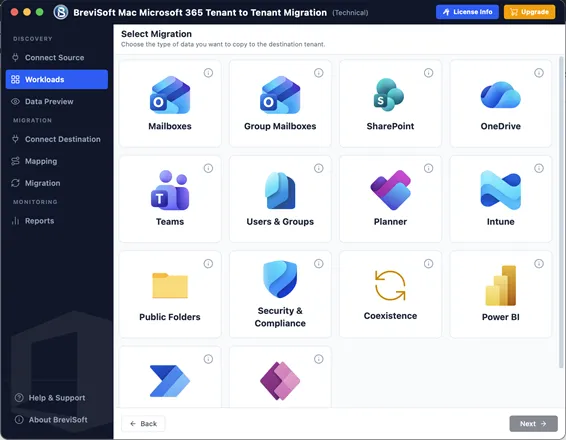
• Migrate All Microsoft 365 Workloads Between Tenants - Transfer Exchange Online mailboxes, OneDrive, SharePoint, and Teams securely.
  • Exchange Online Mailbox Migration - Move emails, contacts, calendars, tasks, attachments, and mailbox permissions safely.
  • OneDrive & SharePoint Migration - Migrate files, folders, permissions, metadata, and document libraries without data loss.
  • Multi-Language Installer - Choose your preferred language during installation for a smooth software setup experience.
pp-box
What's new in BreviSoft Office 365 Tenant Migration Tool
v1.0.0
  • Faster Microsoft 365 mailbox migration engine.
  • Enhanced OneDrive & SharePoint migration support.
  • Improved Microsoft Teams migration performance.
  • Better security with optimized authentication support.
1M+ Downloads
190+ Countries Worldwide
15+ Years Experience

Why Choose BreviSoft Microsoft 365 Tenant to Tenant Migration Tool?

Simplify Complex Microsoft 365 Tenant Migrations with Enterprise-Grade Performance

Complete Microsoft 365 Tenant to Tenant Migration Solution

BreviSoft provides a comprehensive Microsoft 365 Tenant to Tenant Migration solution that securely transfers Exchange Online mailboxes, OneDrive, SharePoint Online, and Microsoft Teams data between tenants. Whether you need Office 365 Tenant to Tenant Migration, Microsoft Tenant Migration, or a complete Microsoft 365 Cross Tenant Migration, the software ensures every mailbox, file, document, and permission is migrated accurately while preserving folder hierarchy, metadata, and sharing settings.

Secure Migration with Zero Data Loss

Security is the highest priority during any Office 365 Cross Tenant Migration. BreviSoft uses Microsoft's modern authentication methods to establish secure connections between source and destination tenants. Throughout the migration process, emails, attachments, contacts, calendars, tasks, OneDrive files, SharePoint documents, Teams data, permissions, timestamps, and metadata remain intact. This enables organizations to perform Secure Tenant to Tenant Migration without worrying about data corruption, missing items, or unauthorized access.

Fast Bulk Migration with Intelligent Automation

BreviSoft is designed to simplify large-scale Office 365 Data Migration and Microsoft 365 Data Migration projects. Administrators can migrate hundreds or even thousands of Microsoft 365 user accounts simultaneously using bulk processing features. The intelligent migration engine automatically maps users, optimizes transfer speed, minimizes manual work, and significantly reduces migration time, making it the ideal Tenant to Tenant Migration Tool for enterprises, managed service providers (MSPs), educational institutions, and government organizations.

User-Friendly Interface with Enterprise-Level Performance

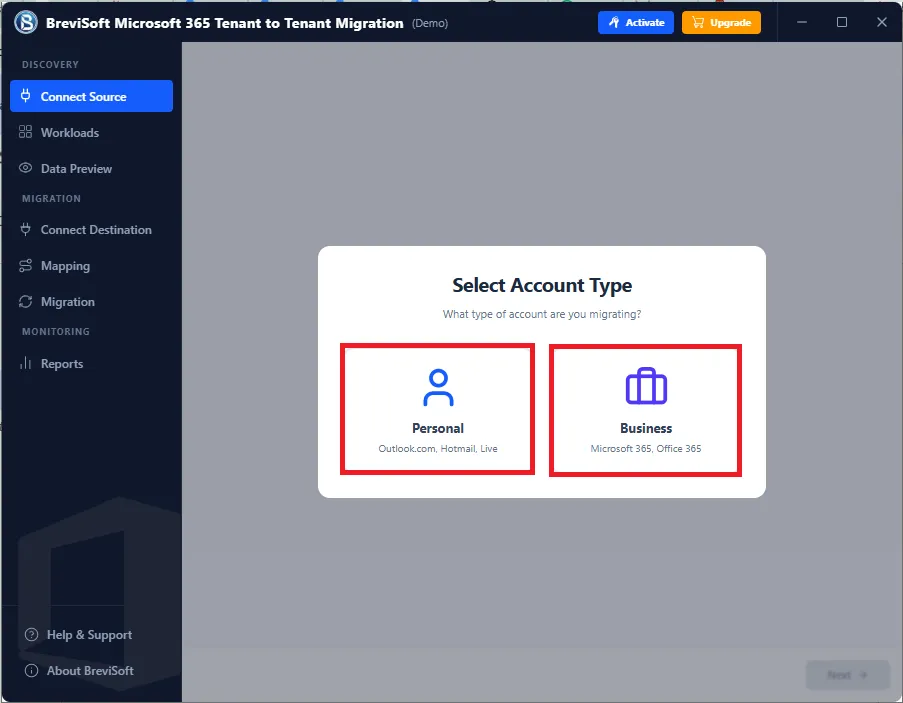
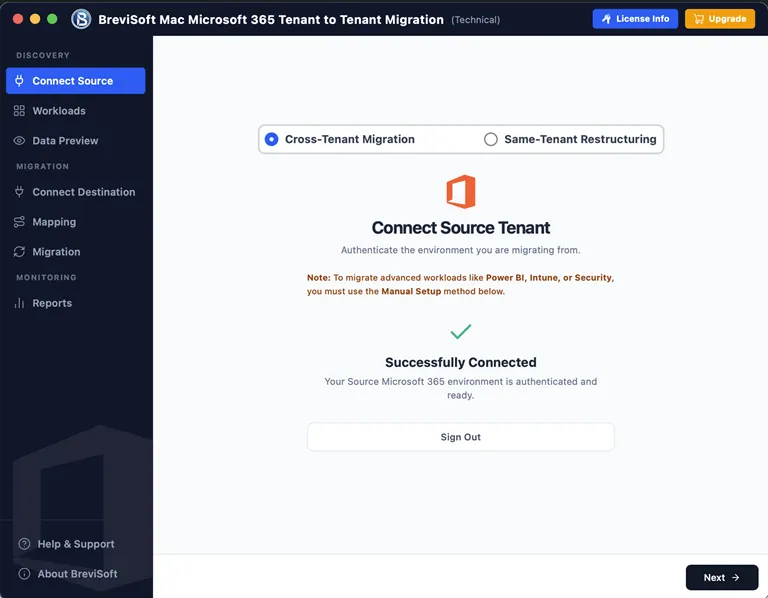
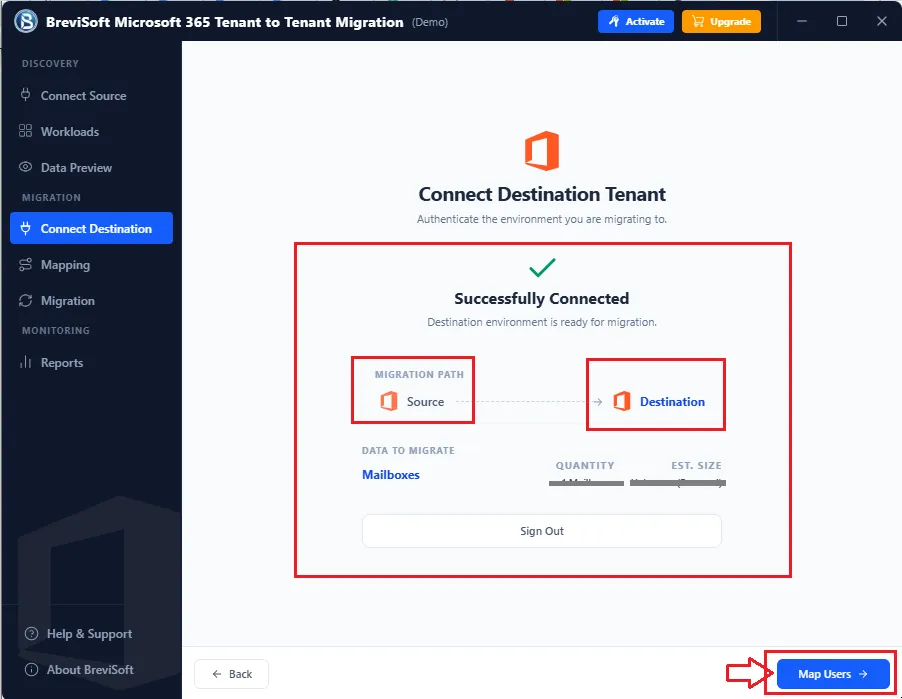
Despite offering enterprise-grade migration capabilities, BreviSoft features a clean, wizard-based interface that anyone can use without technical expertise. Users simply connect both Microsoft 365 tenants, select workloads such as Exchange Online, OneDrive, SharePoint, or Teams, choose migration options, and start the process in just a few clicks. It is an excellent choice for organizations looking to Migrate Microsoft 365 Tenant to Another Tenant, perform an Office 365 Tenant Merge, or execute a complete Microsoft Tenant to Tenant Transfer efficiently and with minimal downtime.

Core Benefits of BreviSoft Office 365 Tenant Migration Tool

Benefit
Description
Business Continuity
Keep users productive during migration with minimal disruption and a seamless transition between Microsoft 365 tenants.
Accurate Data Migration
Transfer Exchange Online, OneDrive, SharePoint, and 365 data while preserving permissions, metadata, and folder hierarchy.
Smart User Mapping
Automatically map source and destination user accounts to reduce manual effort and ensure accurate Microsoft 365 Tenant to Tenant Migration.
High-Speed Bulk Migration
Migrate multiple mailboxes and Microsoft 365 workloads simultaneously using an optimized migration engine for faster project completion.
Intelligent Migration Control
Perform selective migrations with advanced filters, workload selection, scheduling, and comprehensive migration reports.
Enterprise-Grade Security
Protect organizational data with Modern Authentication (OAuth 2.0), secure connections, and reliable migration without compromising data integrity.


Who Uses BreviSoft Microsoft 365 Cross Tenant Migration Tool?

Trusted by enterprises, MSPs, educational institutions, and government organizations for seamless Microsoft 365 Tenant Migration.

Enterprises & Large Organizations
Large enterprises frequently perform Microsoft 365 Tenant to Tenant Migration due to mergers, acquisitions, business restructuring, or tenant consolidation. BreviSoft enables IT administrators to migrate Exchange Online mailboxes, Microsoft Teams, OneDrive, and SharePoint Online while preserving user permissions, metadata, folder hierarchy, and sharing settings. Its bulk migration capability makes it the ideal solution for large-scale Microsoft Tenant Migration projects.
Managed Service Providers (MSPs)
Managed Service Providers require a reliable Tenant to Tenant Migration Tool to handle multiple client migration projects. BreviSoft simplifies Office 365 Tenant to Tenant Migration by supporting bulk mailbox transfers, automated user mapping, secure authentication, and intelligent migration options. MSPs can efficiently migrate multiple Microsoft 365 tenants while reducing manual effort and minimizing project completion time.
Small & Medium Businesses (SMBs)
Growing businesses often need to Migrate Microsoft 365 Tenant to Another Tenant after changing business names, domains, or Microsoft 365 subscriptions. BreviSoft offers an easy-to-use wizard that allows SMBs to securely migrate Exchange Online mailboxes, OneDrive files, SharePoint documents, and Teams data without requiring advanced technical knowledge. The software ensures a smooth Office 365 Tenant Migration with minimal disruption to daily operations.
Educational Institutions
Schools, colleges, universities, and training organizations frequently merge departments or migrate to new Microsoft 365 environments. BreviSoft helps educational institutions perform Microsoft 365 Cross Tenant Migration by transferring faculty and student mailboxes, calendars, contacts, OneDrive storage, SharePoint sites, and Microsoft Teams data while maintaining existing permissions and folder structures.
Government Organizations
Government agencies require secure and compliant Office 365 Data Migration solutions. BreviSoft supports secure authentication and maintains complete data integrity throughout the migration process. It enables departments to transfer Exchange Online mailboxes, SharePoint documents, OneDrive files, and Teams workspaces between Microsoft 365 tenants without compromising sensitive information.
Healthcare Organizations
Hospitals, clinics, and healthcare providers manage large volumes of confidential emails and documents. BreviSoft performs secure Microsoft 365 Data Migration by preserving mailbox contents, patient-related documents, permissions, and metadata. This helps healthcare organizations migrate to new Microsoft 365 tenants while maintaining compliance and ensuring uninterrupted access to business-critical information.
Legal & Financial Firms
Law firms, accounting firms, banks, and financial institutions require accurate Office 365 Cross Tenant Migration with complete preservation of emails, attachments, audit trails, and permissions. BreviSoft ensures secure Tenant to Tenant Mailbox Migration while maintaining the integrity of legal documents, financial records, and confidential communications throughout the migration process.
IT Administrators & System Engineers
IT professionals responsible for managing Microsoft 365 environments rely on BreviSoft to automate complex Microsoft Tenant to Tenant Transfer projects. The software supports bulk user migration, workload selection, migration scheduling, advanced filtering, and detailed reporting, allowing administrators to execute Microsoft 365 Tenant Transfer projects efficiently with minimal downtime.

Advanced Features of BreviSoft Office 365 Tenant Migration Tool

Enterprise-grade features for seamless Microsoft 365 Cross Tenant Migration of mailboxes, OneDrive, SharePoint, and Exchange Online

Complete Microsoft 365 Workload Migration

Complete Microsoft 365 Workload Migration


BreviSoft performs a complete Microsoft 365 Tenant to Tenant Migration by transferring Exchange Online mailboxes, OneDrive accounts, SharePoint Online sites, Microsoft Teams data, contacts, calendars, tasks, permissions, and shared resources between tenants without affecting the original data structure.

Bulk Office 365 Tenant Migration

The software supports simultaneous migration of hundreds or thousands of Microsoft 365 users. Administrators can import user lists, automate mailbox mapping, and migrate multiple accounts in a single operation, making enterprise-level Office 365 Tenant to Tenant Migration faster and more efficient.

Exchange Online Mailbox Migration

Migrate complete Exchange Online mailboxes including emails, attachments, contacts, calendars, tasks, journals, notes, archive mailboxes, shared mailboxes, and mailbox permissions. Every mailbox item is transferred accurately without changing the original folder hierarchy.

Advanced Date Filter for Selective Backup
OneDrive Migration with Permissions

Transfer complete OneDrive accounts including files, folders, shared links, permissions, versions, timestamps, and metadata. The software ensures that every document remains accessible after Tenant to Tenant OneDrive Migration without requiring manual permission configuration.

SharePoint Online Migration

Migrate SharePoint Online sites, document libraries, lists, pages, permissions, metadata, and custom structures between Microsoft 365 tenants. BreviSoft preserves existing security settings while ensuring accurate Tenant to Tenant SharePoint Migration for organizations of every size.

Microsoft Teams Migration

Move Microsoft Teams channels, conversations, files, memberships, and associated SharePoint content between tenants. This feature helps organizations perform complete Microsoft 365 Cross Tenant Migration while maintaining collaboration environments and team structures.

Intelligent User Mapping

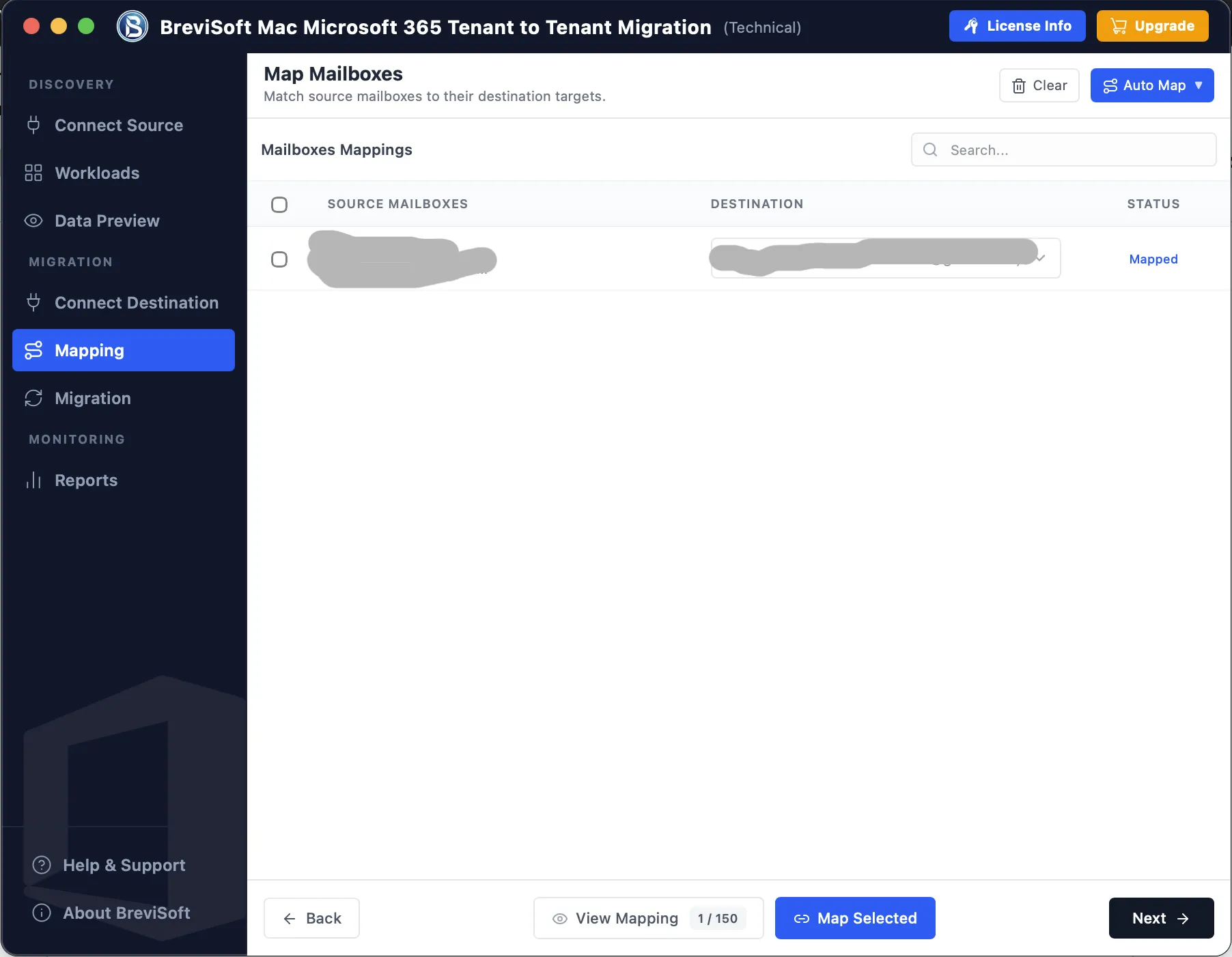
The software automatically maps source users with destination accounts, reducing manual effort and minimizing migration errors. Administrators can also manually edit mappings whenever required for customized Microsoft Tenant Migration projects.

Advanced Date & Mailbox Filters

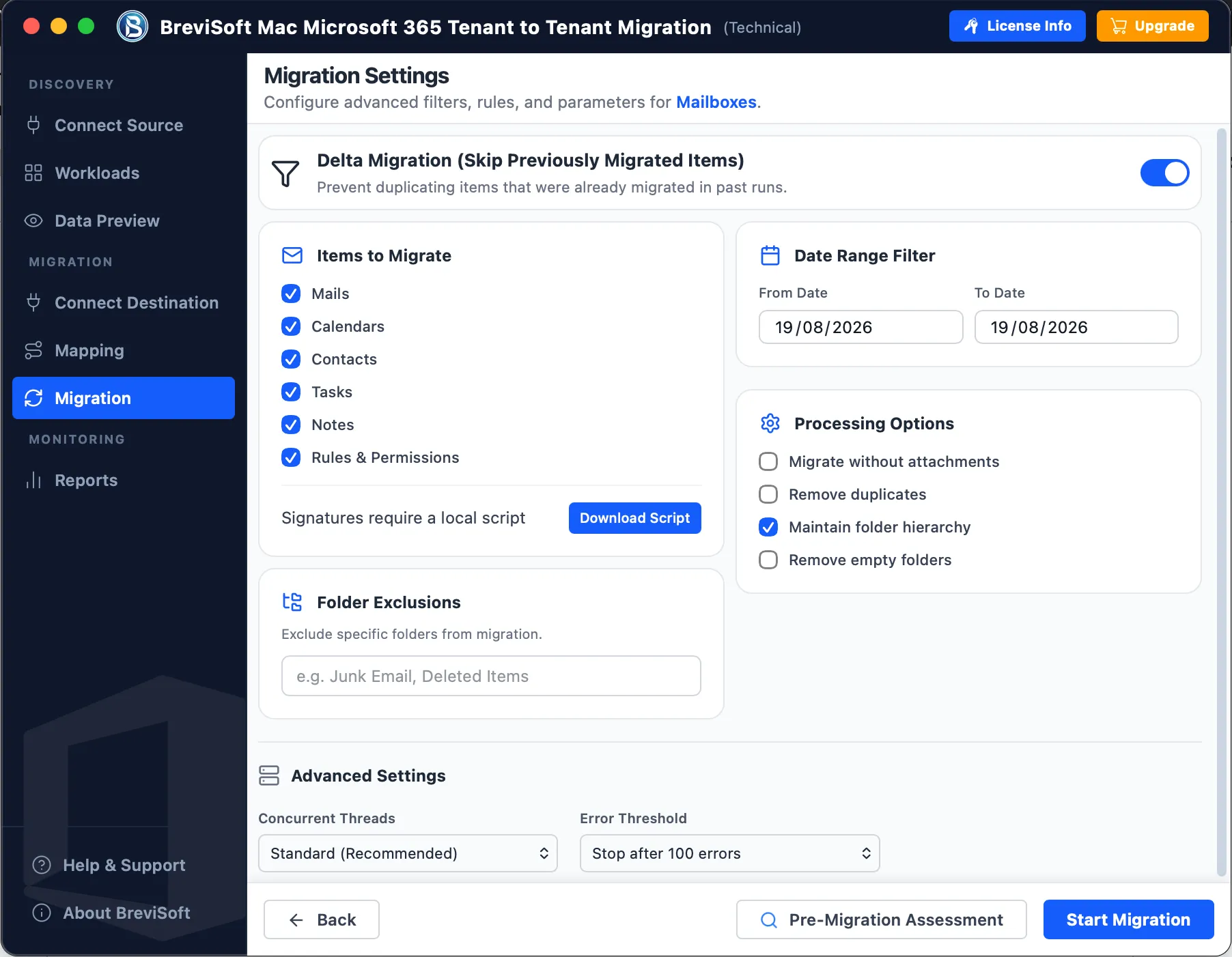
BreviSoft includes intelligent filters that allow administrators to migrate selected mailboxes or emails based on date range, folders, users, and other criteria. This reduces migration time and improves efficiency during large Office 365 Data Migration projects.

Preserve Complete Data Integrity

Every migration preserves mailbox folders, permissions, timestamps, metadata, sharing settings, email formatting, attachments, and document properties. This ensures a reliable Secure Tenant to Tenant Migration without data loss or structural changes.

Modern Authentication Support

The software supports Microsoft's Modern Authentication (OAuth 2.0), enabling secure connections between source and destination Microsoft 365 tenants. This enhances security while complying with Microsoft's latest authentication standards for enterprise environments.

Detailed Migration Reports

After migration, BreviSoft generates comprehensive reports containing migrated users, processed items, skipped files, migration status, timestamps, and error logs. These reports help administrators verify successful Microsoft 365 Tenant Transfer and simplify auditing.

Simple Wizard-Based Interface

BreviSoft combines enterprise-grade migration capabilities with an intuitive step-by-step interface. Even first-time users can connect both tenants, configure migration settings, select workloads, and start Cross Tenant Migration without requiring advanced technical expertise.

BreviSoft Microsoft 365 Migration Tool - Software Specification

Software Download

Size: 42.84 MB

Version: 1.0.0

Demo Limitation

Limitations
The Demo Version allows you to preview all migration features and migrate only 25 items per mailbox/workload. Upgrade to the Full Version for unlimited Microsoft 365 Tenant to Tenant Migration with complete access to all advanced features

System Specifications

Hard Disk Space
500 MB for installation; at least 20 GB of free space required for backup storage

RAM
4 GB is recommended

Processor
Intel®Core™ 2 Duo CPUE 4600@ 2.40GHz 2.39GHz

Internet Connection

Required for Microsoft 365 Authentication & Migration

Application
Pre-Requisites

Run the tool as Standard/Guest User without asking for admin privilege:

  • If installation has done using Admin User, then all Users of machines can run the tool without Admin rights.
  • If installation has done using Standard User with Run as Admin mode, then all Users of machines can run the tool without Admin rights.
  • If installation has done using Standard User without Admin rights, then only same Standard User can run the tool.

Supported Editions

  • Windows OS – Windows 7, 8, 8.1, 10 (32 & 64-bit), Windows 11 (64-bit), Windows Server 2008, 2012 R2, 2016, 2019, 2022

FAQs

Electronic Delivery

Instant digital delivery. Download, install, activate, and start backing up your Yahoo Mail account within minutes.

BreviSoft Microsoft Tenant to Tenant Transfer Tool: Demo vs Full Version Comparison

See the feature differences between the Demo and Full versions before choosing the right Microsoft 365 Tenant Migration solution.

Features Demo Version Full Version
Add Source & Destination Microsoft 365 Tenants Supported Supported
Preview Exchange Online, OneDrive & SharePoint Data Supported Supported
Microsoft 365 Tenant to Tenant Migration Limited Items Only Unlimited Migration
Exchange Online Mailbox Migration First 25 Items per Mailbox Unlimited Mailboxes
OneDrive Migration Limited Files Complete OneDrive Migration
SharePoint Online Migration Limited Sites Unlimited Sites & Libraries
Microsoft Teams Migration Preview Only Complete Teams Migration
Bulk User Migration Limited Supported
Advanced Filters & User Mapping Basic Options Full Advanced Features
Cost Free $50

Why BreviSoft Microsoft 365 Tenant to Tenant Migration Tool Is Better Than Other Software

Trusted by IT professionals for reliable Office 365 Tenant to Tenant Migration with complete workload support and enterprise-level accuracy.

Complete Microsoft 365 Migration Solution

Unlike many migration tools that support only mailbox transfers, BreviSoft migrates Exchange Online, OneDrive, SharePoint Online, Microsoft Teams, permissions, metadata, and shared resources in one unified solution.

Preserves Complete Data Integrity

The software maintains emails, attachments, folder hierarchy, timestamps, permissions, sharing settings, document metadata, calendars, contacts, and tasks throughout the migration process without modifying the original data.

High-Speed Bulk Migration Engine

BreviSoft is designed for enterprise-scale Office 365 Tenant to Tenant Migration projects. Its optimized migration engine transfers multiple user accounts simultaneously, significantly reducing migration time.

Intelligent User Mapping

Automatically maps source users with destination Microsoft 365 accounts, minimizing manual configuration while reducing migration errors and simplifying complex cross-tenant projects.

Advanced Selective Migration

Migrate only the required mailboxes, emails, OneDrive files, SharePoint sites, or Teams data using intelligent filtering based on users, folders, and date ranges.

Secure Modern Authentication

Supports Microsoft's Modern Authentication (OAuth 2.0) to establish secure connections between Microsoft 365 tenants without storing user credentials locally.

Zero Downtime Migration

Organizations can continue daily business operations while the migration runs in the background, making it ideal for Tenant to Tenant Migration without Downtime.

Beginner-Friendly Interface

The step-by-step migration wizard allows both IT administrators and non-technical users to complete Microsoft 365 tenant migrations with minimal learning.

Supports Enterprise & Business Plans

Compatible with Microsoft 365 Business Basic, Standard, Premium, Enterprise (E1, E3, E5), Education, and Government tenants.

Detailed Migration Reports

Generates comprehensive migration reports with user status, migrated items, skipped objects, timestamps, and error logs for complete auditing and verification.

Awards & Ratings – BreviSoft Office 365 Tenant to Tenant Migration Tool

Recognized by leading software review platforms for delivering secure, reliable, and high-performance Microsoft 365 Tenant to Tenant Migration solutions

CNET

CNET Recognized for its intuitive interface, reliable Microsoft 365 Tenant to Tenant Migration tool, and accurate migration of Exchange Online, OneDrive, SharePoint, and Microsoft Teams while preserving permissions and metadata.

Software Informer

Software Informer Praised for enterprise-grade migration performance, secure authentication, bulk migration capabilities, and comprehensive reporting, making it a dependable choice for Microsoft 365 administrators.

Softonic

Softonic Appreciated for its fast migration engine, user-friendly interface, selective migration features, and ability to migrate large Microsoft 365 environments without data loss or downtime.

Software Suggest

Software Suggest Recognized for excellent customer satisfaction, powerful Office 365 cross-tenant migration capabilities, responsive technical support, and reliable performance for businesses of all sizes.

Frequently Asked Questions

Microsoft 365 Tenant to Tenant Migration is the process of transferring Exchange Online mailboxes, OneDrive accounts, SharePoint Online sites, Microsoft Teams data, users, and permissions from one Microsoft 365 tenant to another. BreviSoft automates the entire migration while preserving data integrity and metadata.

Yes. The software performs complete Office 365 Mailbox Migration, including emails, attachments, contacts, calendars, tasks, journals, notes, archive mailboxes, and mailbox permissions without modifying the original folder structure.

Absolutely. BreviSoft securely performs Tenant to Tenant OneDrive Migration, transferring files, folders, versions, permissions, timestamps, sharing settings, and metadata between Microsoft 365 tenants.

Yes. The software supports complete Tenant to Tenant SharePoint Migration, including sites, document libraries, lists, pages, folders, permissions, metadata, and document versions.

Yes. It supports Tenant to Tenant Teams Migration, including Teams, channels, conversations, memberships, files, and associated SharePoint content while maintaining collaboration structures.

Yes. BreviSoft uses Microsoft's OAuth 2.0 Modern Authentication, providing secure connections between source and destination Microsoft 365 tenants without compromising account security.

Yes. The software supports bulk M365 Tenant Migration, allowing administrators to migrate hundreds or thousands of mailboxes, OneDrive accounts, SharePoint sites, and Teams data simultaneously.

Yes. During Microsoft Tenant Migration, the software preserves mailbox permissions, timestamps, folder hierarchy, sharing settings, document metadata, and access permissions throughout the migration process.

Yes. The advanced filtering feature lets you migrate selected users, mailboxes, folders, emails, OneDrive files, SharePoint libraries, or date ranges instead of transferring the entire tenant.

Yes. The software is specifically designed for secure Office 365 Cross Tenant Migration and supports Exchange Online, OneDrive, SharePoint Online, and Microsoft Teams migration between tenants.

Yes. All email attachments, embedded images, inline content, and file attachments are migrated during Tenant to Tenant Email Migration without size restrictions imposed by the software.

Yes. BreviSoft helps organizations Merge Two Microsoft 365 Tenants by migrating users, mailboxes, OneDrive, SharePoint, and Teams data into a single destination tenant while preserving existing permissions.

The software is designed to support Tenant to Tenant Migration without Downtime by minimizing service interruptions. Users can continue working while migration tasks are processed according to your migration plan.

Yes. BreviSoft supports Microsoft 365 Business Basic, Business Standard, Business Premium, Enterprise (E1, E3, E5), Education, Government, and other Microsoft 365 subscriptions.

BreviSoft offers a complete Microsoft 365 Cross Tenant Migration solution with high-speed migration, bulk processing, intelligent user mapping, advanced filtering, Modern Authentication, detailed reports, and preservation of permissions, metadata, and folder hierarchy, making it one of the Best Tenant to Tenant Migration Tools for organizations of all sizes.

What Customers Are Saying

BreviSoft Microsoft 365 Tenant to Tenant Migration Tool – Verified Purchase Reviews