

Table of Contents
Why You Might Need to Open a PST File Without Outlook
Let’s say you get a mailbox backup from a coworker who left the company. Your computer has no Outlook. You just need one email from last year.
Or maybe you switched to a Mac. Or your work laptop blocks new software. Both happen a lot.
Cost is another reason. Outlook isn’t free, and paying for it to read one old file feels like a waste. That’s why many people search for how to open PST file without Outlook installed.
Sometimes Outlook itself is the problem. It freezes on a big file or won’t start at all. Then you need to read PST file without MS Outlook just to get your emails back.
Top Ways to View PST Files Without Installing Outlook
Three main options can open your PST file without Outlook.
- Using Mozilla Thunderbird
- By Using GWMMO
- Using a dedicated PST file viewer
The first two are free, but they come with catches. The third is where most people end up after wasting time on the others.
Free Manual Workarounds to Access PST Files Outside of Outlook
Want to view PST file free of charge? These are the usual tricks. They can work. But expect some trouble.
Method 1: Open PST Files Using Mozilla Thunderbird
Thunderbird can import Outlook data. The catch is that on Windows, it usually needs Outlook on the same computer. So the trick to open PST without Outlook often asks for Outlook. Frustrating, right?
If you can use a computer that has Outlook, here’s how:
- Install and open Thunderbird.
- Click the Tools menu and choose Import.
- Select Mail, then pick Outlook.
- Wait for the import to finish, then look in Local Folders.
If the import fails, that’s not your fault. Missing Outlook is the cause.
Method 2: Access PST Files without MS Outlook Using GWMMO
GWMMO stands for Google Workspace Migration for Microsoft Outlook. It uploads your PST data to a Google account, and you read it in Gmail.
Here’s the problem. It works through an Outlook profile, so you still need Outlook installed. You also need a Windows PC and a Google account. Google has also been phasing out some older migration tools, so check that it’s still available before you start.
Even when it works, it’s slow. Large files can take hours. And your emails get uploaded to Google’s servers, which may not be okay for private or work data.
Limitations and Risks of Using Manual Methods
- Hidden Outlook need – Both methods may still require Outlook.
- Trouble with big files – Large PST files often freeze or crash.
- Messy results – Folders and some attachments may not come across right.
- Privacy risk – Cloud methods send your data off your computer.
- Lost time – A quick job can turn into an afternoon.
For a small file you don’t care about, that’s fine. For anything important, it’s risky.
Method 3: Use a Dedicated PST Viewer for Hassle-Free Access
A PST file viewer reads the file directly. No import. No account. No Outlook.
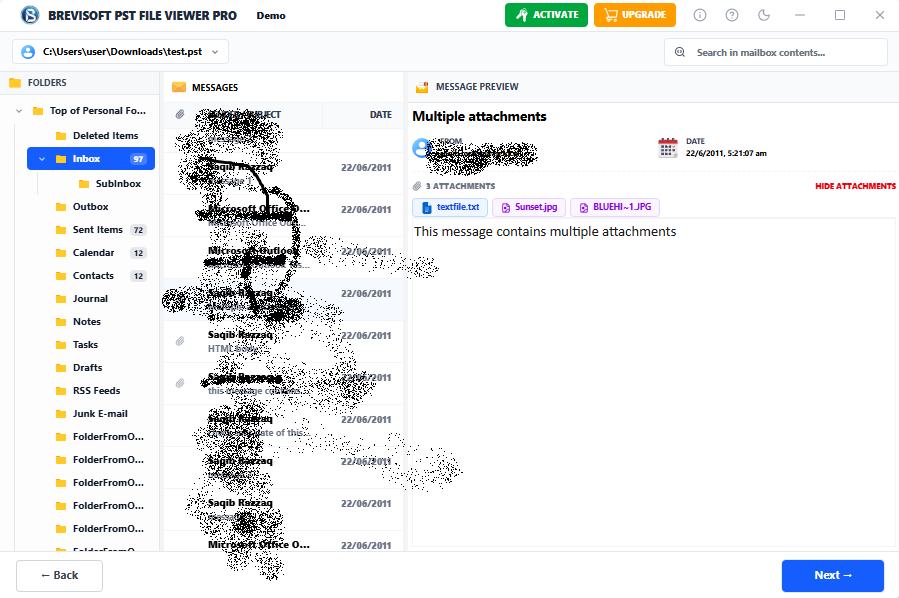
With BreviSoft PST Viewer Tool, you add your file and let it scan. Your folders show up on the left, your emails sit next to them, and clicking one opens it in a preview window. You can also view contacts, calendars, and notes. It also converts Outlook emails to PDF, including all attachments, without installing Outlook.
Here’s what it offers:
- Works on a computer that has never had Outlook or Office.
- Shows email headers, message text, and attachments.
- Searches by sender, subject, date, or keyword.
- Handles large PST files without freezing.
- Saves selected emails as PDF and other formats.
- Works in read-only mode, so your original file stays safe.
Follow the Steps to Open PST File without Outlook Using BreviSoft PST Viewer
- Install and open the BreviSoft PST Viewer tool.
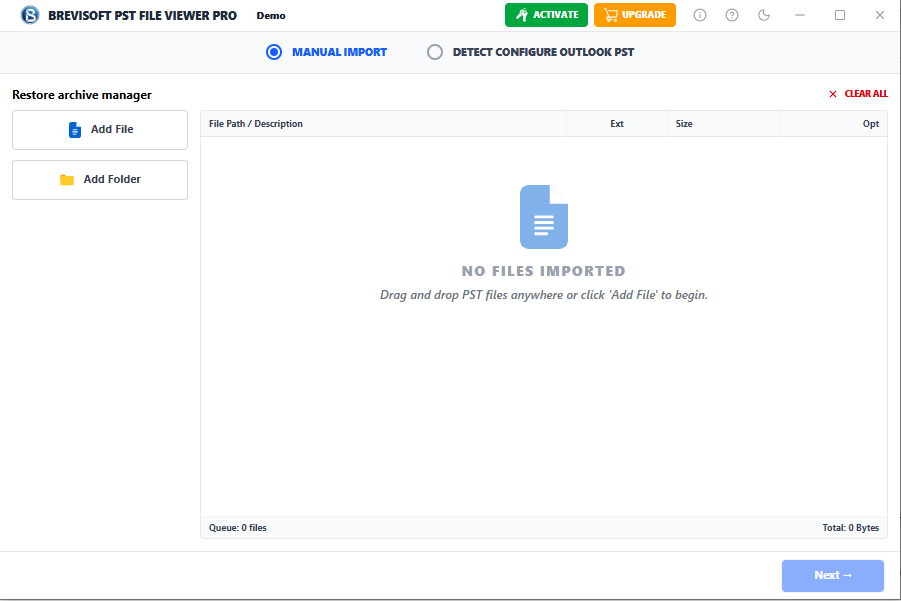
- Click Add File and choose your PST file.
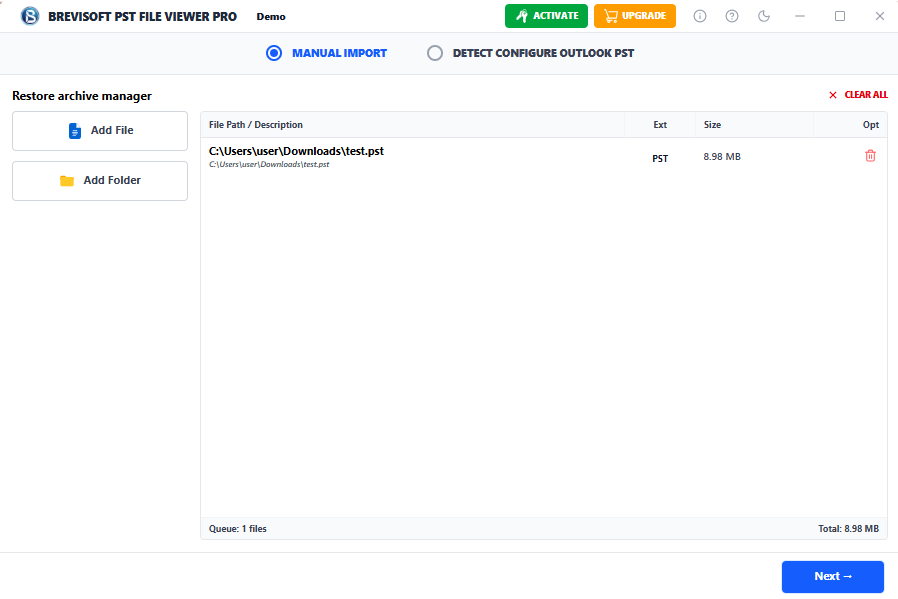
- Wait for the scan to finish.
- Browse your folders and click any email to read it.
- Choose saving options as PDF format.
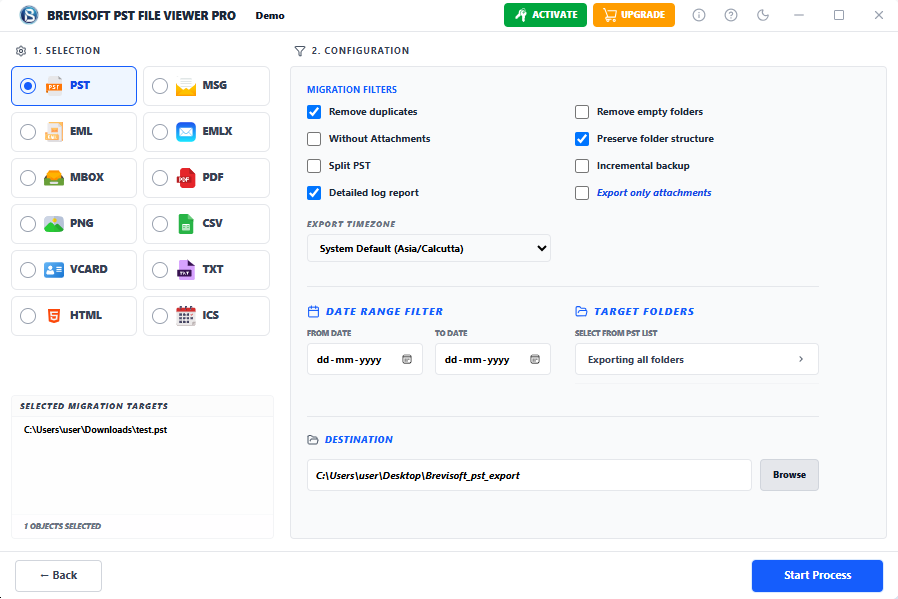
- Click on the Convert button and open the converted PST file.
If you need to read PST file without MS Outlook today, this is the easiest way.
Conclusion: Which Method Should You Choose?
Have a small file, some free time, and a computer with Outlook nearby? Try Thunderbird. It may not work, though. GWMMO only makes sense if you want your emails in Gmail anyway.
For everyone else, a dedicated BreviSoft PST Viewer Tool is the better pick. It skips the Outlook problem, handles big files, and keeps your data on your own computer. Most people try the free methods first and end up here anyway.
Frequently Asked Questions (FAQs)
Ans – Yes, but with limits. Thunderbird and GWMMO are free, but they often need Outlook. Some viewer tools have a free trial that lets you preview your emails. That’s enough if you only need to take a look.
Ans – Use a standalone viewer. Install it, add your PST file, and let it scan. Your emails will show up in folders. You don’t need an account or an import.
Ans – Usually, yes, if you download it from the official website. Choose a read-only tool so your original file isn’t changed. Also keep a backup copy, just in case.
Ans – Yes. BreviSoft PST Viewer lists the attachments under each email. You can open or save them right away, whether they’re PDFs, photos, or Word files.
