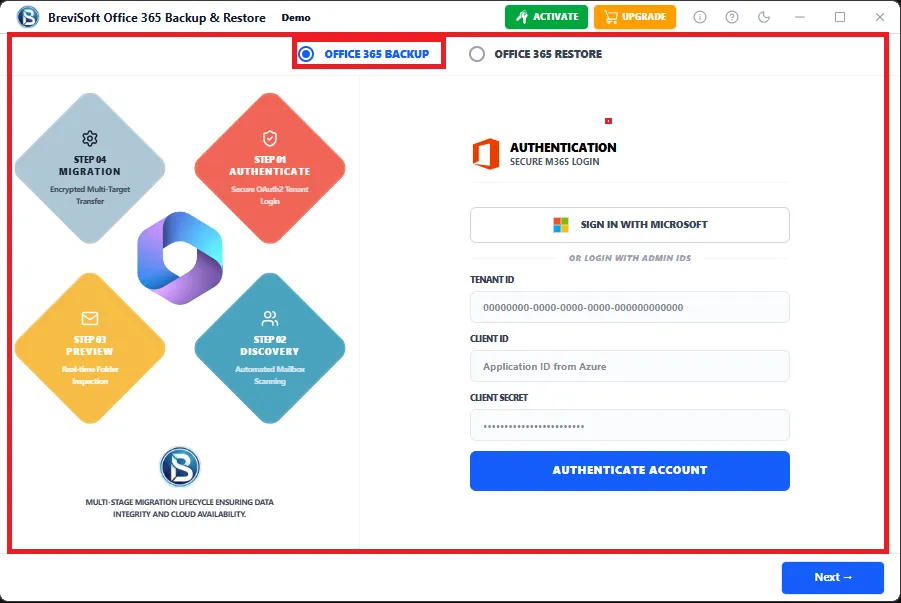
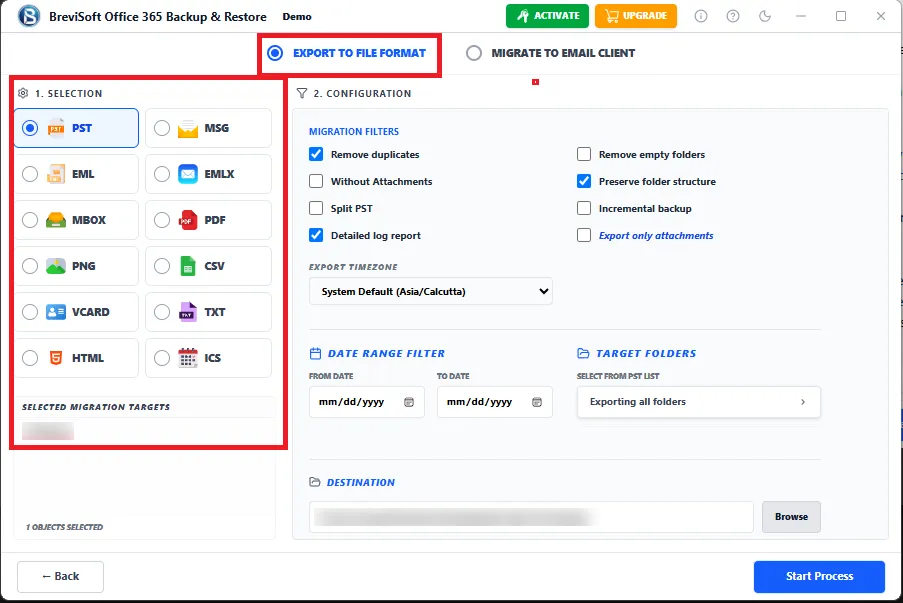
• Backup Office 365 emails to PST, PDF, EML, EMLX, MSG, MBOX, JSON, vCard and CSV while preserving mailbox integrity.
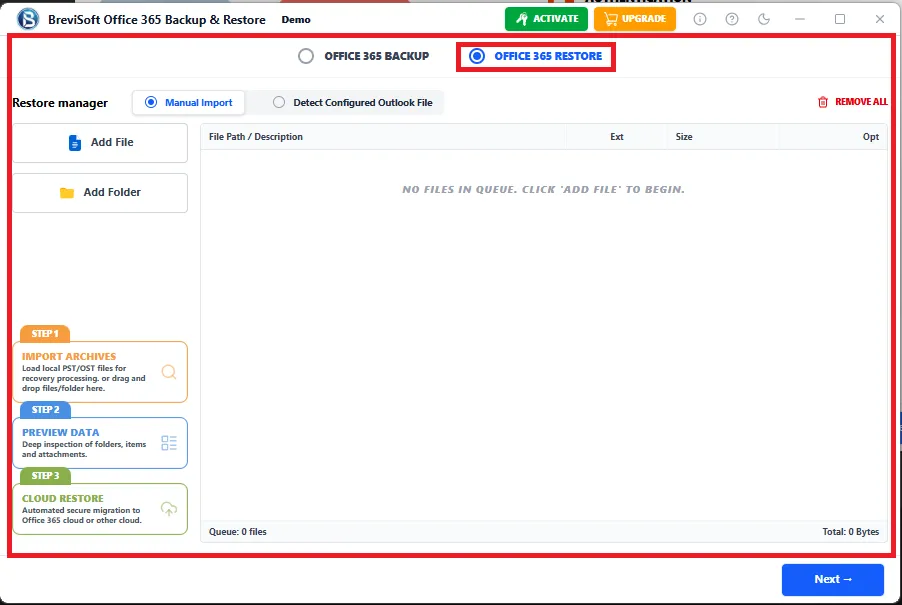
  • Restore Outlook PST & OST files directly into Microsoft 365 with complete accuracy.
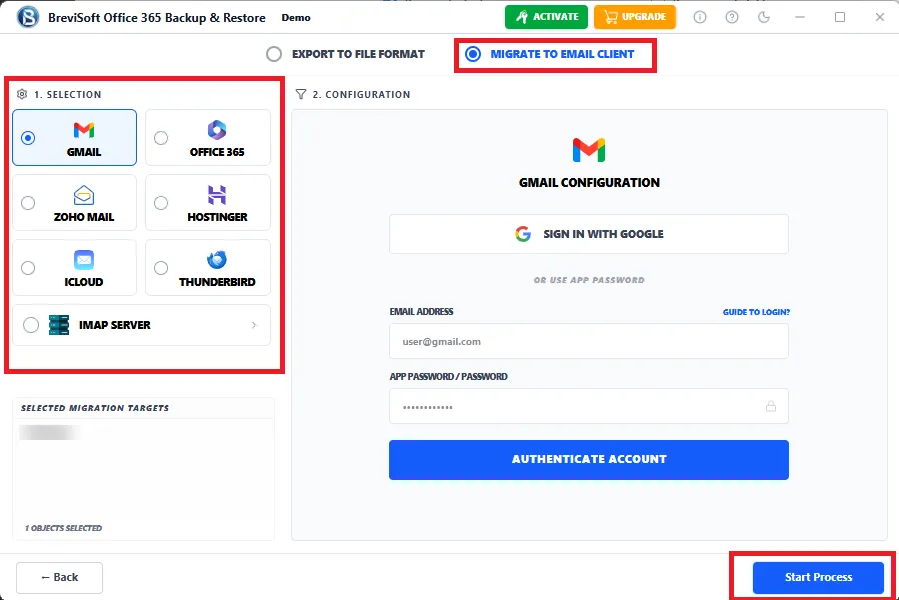
  • Migrate Office 365 mailboxes directly to Gmail, Exchange Server, Microsoft 365, or any IMAP-enabled email service with complete data integrity.

What's new in Microsoft 365 Backup Software
v1.0.0
  • Smart Incremental Backup of Microsoft 365
  • Faster Multi-Mailbox Processing
  • Enhanced Office 365 Restore
  • Improved IMAP Migration Engine
1M+ Downloads
190+ Countries Worldwide
15+ Years Experience

Why Choose BreviSoft Office 365 Backup Tool?

Complete Microsoft 365 Backup Solution

BreviSoft Office 365 Backup Tool provides a comprehensive Office 365 Backup Solution for organizations, IT administrators, businesses, and home users. It allows you to create secure backups of emails, contacts, calendars, journals, tasks, and attachments while maintaining the original folder hierarchy and mailbox properties. Whether you need Office 365 Tenant Backup, Exchange Online Backup, or Outlook 365 Backup, the software delivers reliable performance with enterprise-grade accuracy.

Supports Backup, Restore & Migration

Unlike many traditional backup utilities, BreviSoft combines backup, restore, and migration features into one application. Users can export Office 365 mailboxes into multiple file formats, restore PST and OST files back to Microsoft 365, and migrate Office 365 accounts directly to Gmail, Exchange Server, Microsoft 365 tenants, or any IMAP-enabled email account. This all-in-one functionality reduces the need for multiple software solutions.

Advanced Backup with Intelligent Filters

BreviSoft includes powerful filtering options that help users perform Office 365 Selective Backup instead of downloading the entire mailbox. Users can filter emails by date range, sender, recipient, subject, folder, read/unread status, attachment availability, and more. Combined with Office 365 Incremental Backup, scheduled backup, and bulk mailbox processing, the software minimizes backup time while maximizing storage efficiency.

Trusted Security with Maximum Data Integrity

Data security is a top priority for every Microsoft 365 user. BreviSoft Office 365 Backup Software performs a completely read-only backup process, ensuring that no data is modified, deleted, or overwritten during export. It preserves email formatting, metadata, attachments, Internet headers, and folder hierarchy with complete accuracy. This makes it one of the best choices for businesses seeking a secure Microsoft 365 Data Backup solution.

Advanced Search & Export Feature - BreviSoft Office 365 Backup Software

BreviSoft Office 365 Backup Tool includes an intelligent Advanced Search & Export engine that helps users perform precise Office 365 Backup and Microsoft 365 Backup operations. Instead of exporting an entire mailbox, users can back up only the required emails, folders, contacts, calendars, or attachments using multiple search filters. This feature significantly reduces backup time, saves storage space, and improves mailbox management.

Whether you want to Backup Office 365 Account, create an Office 365 Tenant Backup, or perform Exchange Online Backup, the software provides complete flexibility for personal users, businesses, and enterprise IT administrators.

Advanced Search Options

Date Range Filter

Select a custom From and To date to backup emails within a specific period. This option is ideal for yearly, monthly, legal, or compliance-based mailbox backups while avoiding unnecessary email exports.

From (Sender) Filter

Export emails from one or multiple specific senders. This option helps organizations archive client communications, vendor emails, or internal conversations quickly.

To (Recipient) Filter

Backup emails sent to a particular recipient or department. It is especially useful for auditing employee communications and project-specific email records.

Subject Filter

Search and export emails containing particular words or phrases in the subject line. Users can easily locate invoices, contracts, purchase orders, or project-related emails.

Folder Selection

Choose only the required Office 365 folders such as:

  • Inbox
  • Sent Items
  • Drafts
  • Deleted Items
  • Archive
  • Junk Email
  • Custom Folders

This enables Office 365 Folder Backup instead of downloading the entire mailbox.

Include Attachments

Users can export emails with or without attachments depending on storage requirements. The software always preserves original attachments without any modification.

Skip Empty Folders

Automatically ignores empty folders during backup, reducing export time and creating a cleaner backup structure.

Incremental Backup

The software identifies previously backed-up emails and downloads only newly received messages during subsequent backups. This intelligent Office 365 Incremental Backup saves bandwidth, storage, and processing time.

Supports Backup Microsoft 365 Emails to Multiple Formats

BreviSoft Office 365 Backup Tool allows users to export Office 365 mailbox data into numerous popular file formats according to their business or personal requirements.

Supported Export Formats:

  • ✅ PST
  • ✅ PDF
  • ✅ EML
  • ✅ EMLX
  • ✅ MSG
  • ✅ MBOX
  • ✅ CSV
  • ✅ HTML
  • ✅ DOC
  • ✅ TXT
  • ✅ JSON
  • ✅ ICS
  • ✅ VCF
  • ✅ ODT
  • ✅ OTT

Restore Outlook PST & OST to Office 365

Whether you have Outlook archive files or offline OST data, BreviSoft makes mailbox restoration simple. Users can upload PST and OST files directly into Microsoft 365 mailboxes while maintaining:

  • ✅ Folder hierarchy
  • ✅ Email formatting
  • ✅ Internet headers
  • ✅ Metadata
  • ✅ Attachments
  • ✅ Calendar events
  • ✅ Contacts
  • ✅ Tasks

Directly Migrate Office 365 Mailbox

The software also works as a professional Microsoft 365 Migration Tool.

Supported Migration Destinations:

  • ✅ Gmail
  • ✅ Microsoft 365
  • ✅ Office 365
  • ✅ Exchange Server
  • ✅ Live Exchange
  • ✅ IMAP Server
  • ✅ Yahoo Mail
  • ✅ Outlook.com
  • ✅ Hotmail
  • ✅ Live Mail

Save Microsoft 365 Mailbox to Any IMAP Email Service

BreviSoft Office 365 Backup Software supports direct migration to almost every popular IMAP-enabled email platform including:

  • ✅ Gmail
  • ✅ Outlook.com
  • ✅ Office 365
  • ✅ Microsoft 365
  • ✅ AOL Mail
  • ✅ Apple iCloud Mail
  • ✅ Zoho Mail
  • ✅ ProtonMail (Bridge)
  • ✅ Fastmail
  • ✅ GMX Mail
  • ✅ Mail.com
  • ✅ Yandex Mail
  • ✅ Tutanota (Bridge)
  • ✅ Mail.ru
  • ✅ Rackspace Email
  • ✅ Bluehost
  • ✅ HostGator
  • ✅ DreamHost
  • ✅ GoDaddy Workspace Email
  • ✅ Namecheap Private Email
  • ✅ IONOS Mail

Who Uses BreviSoft Office 365 Backup Tool?

Home Users
Individuals use BreviSoft Office 365 Backup Tool to protect important personal emails, contacts, calendars, invoices, travel bookings, and family records. Creating a local Office 365 Backup ensures access to important information even if emails are accidentally deleted or an account becomes unavailable.
Small Businesses
Small businesses rely on Microsoft 365 for daily communication with customers, vendors, and employees. BreviSoft enables organizations to create secure Microsoft 365 Data Backup, archive business communications, and quickly restore important mailboxes whenever needed.
IT Administrators
IT teams use the software to perform Office 365 Tenant Backup, Office 365 Shared Mailbox Backup, bulk mailbox backup, scheduled backups, and disaster recovery planning. The software simplifies large-scale mailbox management while reducing administrative workload.
Enterprises
Large organizations managing hundreds or thousands of Microsoft 365 users require a reliable Microsoft 365 Mailbox Backup Tool. BreviSoft supports Office 365 Backup Multiple Accounts, incremental backup, selective backup, and secure migration with enterprise-level performance.
Legal & Compliance Teams
Law firms, financial institutions, healthcare providers, and government organizations use the software to preserve emails for audits, legal investigations, and compliance requirements. Exporting Office 365 emails to PDF or PST ensures secure long-term record retention.
Educational Institutions
Schools, colleges, universities, and research organizations use Microsoft 365 extensively. BreviSoft helps administrators back up faculty emails, student communications, departmental mailboxes, and archived records with complete data integrity.
Managed Service Providers (MSPs)
MSPs managing multiple client Microsoft 365 environments can efficiently perform Office 365 Bulk Backup, tenant migration, mailbox restoration, and scheduled backups from a single easy-to-use application.

Advanced Features of BreviSoft Office 365 Backup Tool

Discover advanced Office 365 backup capabilities for secure, fast, and reliable mailbox management.

Office 365 Incremental Backup

Office 365 Incremental Backup


BreviSoft Office 365 Backup Tool includes an intelligent incremental backup feature that automatically detects previously backed-up mailbox data and downloads only newly received emails during subsequent backup sessions. This significantly reduces backup time, minimizes bandwidth consumption, saves storage space, and allows users to maintain up-to-date Microsoft 365 backups without creating duplicate email data.

Office 365 Scheduled Backup

The software allows users to automate Microsoft 365 mailbox backups by creating daily, weekly, or monthly backup schedules according to their requirements. Once configured, backups run automatically without manual intervention, ensuring continuous protection of business-critical emails. Scheduled backup helps organizations maintain regular data protection policies while reducing administrative workload and eliminating the risk of missed backups.

Office 365 Selective Backup

BreviSoft provides advanced filtering options that enable users to back up only the mailbox data they actually need. Users can filter emails by date range, sender, recipient, subject, folder name, or other criteria before starting the backup process. This selective approach reduces storage usage, speeds up backup operations, and helps organizations archive only relevant Microsoft 365 emails.

Office 365 Bulk Backup

The Office 365 Backup Tool supports simultaneous backup of multiple Microsoft 365 user accounts in a single operation. IT administrators can efficiently back up hundreds of mailboxes without affecting system performance or data accuracy. This feature is ideal for enterprises, educational institutions, government organizations, managed service providers (MSPs), and businesses managing large Microsoft 365 environments.

Backup with Complete Metadata

During every Office 365 backup operation, the software preserves all email properties and mailbox information without modification. It maintains sender and recipient details, email headers, timestamps, message IDs, categories, read/unread status, Internet headers, folder hierarchy, and other metadata. This ensures restored or exported emails remain identical to their original Microsoft 365 mailbox structure.

Backup Emails with Attachments

BreviSoft securely backs up Office 365 emails together with all associated attachments, including PDF files, Word documents, Excel spreadsheets, PowerPoint presentations, images, ZIP archives, videos, and other file types. Every attachment is preserved in its original format, filename, and quality, ensuring complete mailbox data remains available for future access, migration, or compliance requirements.

Office 365 Shared Mailbox Backup

The software supports secure backup of Microsoft 365 shared mailboxes while preserving the original folder hierarchy and mailbox organization. Shared mailbox data used by customer support, sales, HR, finance, and collaborative teams can be safely archived without losing email integrity. This feature helps organizations maintain business continuity and protect important shared communications.

Office 365 Archive Mailbox Backup

In addition to primary mailboxes, BreviSoft also backs up Microsoft 365 Online Archive mailboxes with complete accuracy. Archived emails remain properly organized along with their original folder structure, metadata, and attachments. This feature helps organizations meet legal, compliance, auditing, and long-term email retention requirements while ensuring historical business communications remain easily accessible.

Office 365 Tenant Backup

BreviSoft enables administrators to create complete Microsoft 365 tenant backups by exporting multiple user mailboxes in a single operation. This centralized backup capability simplifies enterprise data protection, disaster recovery planning, and compliance management. Organizations can efficiently safeguard their entire Microsoft 365 environment while reducing administrative effort and minimizing backup management complexity.

Secure Read-Only Backup Process

Every backup performed by BreviSoft operates in a completely secure read-only mode, ensuring that no changes are made to the original Microsoft 365 mailbox. The software never edits, deletes, overwrites, or modifies existing emails or folders during backup or migration. This guarantees complete data integrity, maximum security, and reliable protection of business-critical mailbox information.

High-Speed Backup Engine

The software is powered by an advanced, high-performance processing engine designed to efficiently handle large Microsoft 365 mailboxes containing thousands of emails, folders, and attachments. Optimized backup algorithms ensure faster data processing while maintaining complete accuracy and mailbox integrity. This significantly reduces backup duration and improves productivity for both individual users and enterprise environments.

Simple Wizard-Based Interface

BreviSoft Office 365 Backup Tool features a clean, modern, and wizard-based interface that makes the backup process simple for users of all experience levels. Step-by-step guidance helps users easily configure backup, restore, and migration operations without requiring technical expertise. The intuitive design minimizes learning time while allowing both home users and IT professionals to complete tasks quickly and efficiently.

BreviSoft Microsoft 365 Backup Software - Specifications

Complete System Requirements and Technical Specifications for Microsoft 365 Backup

Software Download

Size: 42.84 MB

Version: 1.0.0

Demo Limitation

Limitations
Download the free trial of BreviSoft Office 365 Backup Tool to evaluate all major features. The demo version allows you to back up and export up to 50 items per folder, helping you verify software performance before purchasing the full version.

System Specifications

Hard Disk Space
500 MB for installation; at least 20 GB of free space required for backup storage

RAM
4 GB is recommended

Processor
Intel®Core™ 2 Duo CPUE 4600@ 2.40GHz 2.39GHz

Application
Pre-Requisites

Run the tool as Standard/Guest User without asking for admin privilege:

  • If installation has done using Admin User, then all Users of machines can run the tool without Admin rights.
  • If installation has done using Standard User with Run as Admin mode, then all Users of machines can run the tool without Admin rights.
  • If installation has done using Standard User without Admin rights, then only same Standard User can run the tool.

Supported Desktop Operating Systems

  • Windows OS – Windows 7, 8, 8.1, 10 (32-bit & 64-bit), Windows 11 (64-bit)

Supported Microsoft 365 Plans

  • Microsoft 365 Personal, Family, Business Basic, Business Standard, Business Premium, Enterprise (E1, E3, E5), Education, Government

Supported Office
365 Services

  • Outlook Mail, Contacts, Calendars, Tasks, Journals, Notes, Shared Mailboxes, Archive Mailboxes

Installation Languages

  • English, German, French, Spanish, Italian, Portuguese, Dutch, Japanese, Korean, Chinese, Russian & more

FAQs

Electronic Delivery

Instant digital delivery. Download, install, activate, and start backing up IMAP email accounts in minutes.

BreviSoft Office 365 Backup Tool: Demo vs Full Version Comparison

Explore the Features Included in the Demo and Full Versions Before You Buy

Features Demo Version Full Version
Backup Office 365 Mailbox Backup only 50 items per folder Backup unlimited Office 365 mailboxes
Export Mailbox to PST, PDF, MBOX, EML, MSG, CSV, vCard File Formats Export only 50 items per folder in all supported formats Unlimited export Mailbox to Various File Formats
Backup Multiple Accounts Backup unlimited Microsoft 365 accounts
Office 365 Incremental Backup Backup only newly arrived emails
Office 365 Scheduled Backup Daily, Weekly & Monthly scheduled backup
Office 365 Selective Backup Limited filters with 50 items per folder Advanced search & export filters
PST & OST Restore to Office 365 Unlimited mailbox restore
Microsoft 365 Migration Backup only 50 items per folder Migrate to Gmail, Exchange & IMAP accounts
Office 365 Tenant Backup Backup only 50 items per folder Complete tenant backup support
Shared Mailbox Backup Backup only 50 items per folder Backup complete shared mailboxes
Technical Support Free basic technical support Priority technical support with free updates
License Free Trial (50 items per folder) Lifetime & Business License Options
Cost Free $50

Why BreviSoft Microsoft 365 Backup Software Is Better Than Other Software

All-in-One Backup, Restore & Migration Solution

Most backup tools only export Microsoft 365 emails. BreviSoft combines Office 365 Backup, Microsoft 365 Restore, and direct mailbox migration into one professional application. Users can backup, restore, or migrate mailboxes without purchasing multiple software products.

Supports 15+ Export Formats

Unlike many competitors that only export to PST, BreviSoft supports Office 365 to PST, Office 365 to PDF, Office 365 to MBOX, Office 365 to EML, Office 365 to MSG, HTML, DOC, TXT, JSON, CSV, VCF, ICS, ODT, and OTT. This provides maximum flexibility for business, legal, and personal use.

Direct Migration to Popular Email Services

BreviSoft allows direct migration from Microsoft 365 to Gmail, Microsoft 365, Exchange Server, Outlook.com, Yahoo Mail, Zoho Mail, iCloud Mail, AOL Mail, ProtonMail, Fastmail, and virtually any IMAP-enabled email service without requiring intermediate file exports.

Intelligent Incremental Backup

The software performs Office 365 Incremental Backup, downloading only newly received emails after the initial backup. This significantly reduces storage usage, network traffic, and backup time compared to traditional full-backup solutions.

Enterprise-Level Multi-Mailbox Backup

Designed for businesses and IT administrators, the software supports Office 365 Backup Multiple Accounts, Office 365 Bulk Backup, Office 365 Tenant Backup, and Office 365 Shared Mailbox Backup with high-speed processing.

Preserves Complete Mailbox Integrity

BreviSoft maintains folder hierarchy, email formatting, metadata, attachments, Internet headers, categories, read/unread status, and timestamps throughout backup, restore, and migration operations, ensuring complete data accuracy.

Advanced Search & Smart Filtering

Powerful filters enable users to perform Office 365 Selective Backup based on date range, sender, recipient, subject, folders, and attachment availability. This minimizes unnecessary exports and improves backup efficiency.

Safe Read-Only Backup Technology

The software performs all backup operations in read-only mode. Original mailbox data remains unchanged throughout the process, providing a secure and reliable Microsoft 365 Data Backup solution for businesses and individuals.

Modern & User-Friendly Interface

A simple step-by-step wizard enables both beginners and IT professionals to complete backup, restore, and migration tasks without technical complexity or lengthy training.

Dedicated Technical Support

BreviSoft provides responsive technical assistance, regular software updates, and detailed documentation to help users successfully complete Microsoft 365 backup and migration tasks.

Awards & Ratings – BreviSoft Office 365 Backup Tool
CNET

CNET BreviSoft Office 365 Backup Tool offers a complete set of backup, restore, and migration features with a simple interface, making it a practical solution for users looking to securely protect Microsoft 365 mailbox data.

Software Informer

Software Informer Recognized by users for its straightforward workflow, multiple export options, and reliable Office 365 backup capabilities. The software is designed for both individual users and IT professionals.

Softonic

Softonic BreviSoft provides an intuitive backup experience with support for multiple export formats, Office 365 mailbox migration, and secure data preservation, making daily backup tasks simple and efficient.

Software Suggest

Software Suggest Suitable for businesses seeking secure Microsoft 365 mailbox backup, restore, and migration. Its enterprise-ready capabilities help organizations efficiently protect important business communications.

Frequently Asked Questions

BreviSoft Office 365 Backup Tool is a professional Office 365 Backup Software that helps users securely backup Microsoft 365 mailboxes, including emails, contacts, calendars, tasks, journals, and attachments. It also supports Office 365 restore and mailbox migration to Gmail, Exchange Server, Microsoft 365, and IMAP-enabled email accounts.

Yes. The software allows you to Backup Microsoft 365 Mailbox completely, including Inbox, Sent Items, Drafts, Deleted Items, Archive, custom folders, contacts, calendars, tasks, notes, and attachments while maintaining the original folder hierarchy.

BreviSoft supports exporting Office 365 mailbox data to:

  • PST
  • PDF
  • MBOX
  • EML
  • EMLX
  • MSG
  • CSV
  • HTML
  • DOC
  • TXT
  • JSON
  • ICS
  • VCF
  • ODT
  • OTT

This makes it one of the most versatile Microsoft 365 Backup Tools available.

Yes. The Office 365 Incremental Backup feature exports only newly received emails after the initial backup, reducing backup time, storage consumption, and network bandwidth.

Absolutely. BreviSoft includes an integrated Office 365 Restore Tool that restores Outlook PST and OST files directly into Microsoft 365 mailboxes while preserving email formatting, folder hierarchy, metadata, and attachments.

Yes. The software supports direct migration from Microsoft 365 to Gmail, Google Workspace, Exchange Server, Outlook.com, Yahoo Mail, Zoho Mail, and other IMAP-enabled email services without creating intermediate files.

Yes. It supports complete Office 365 Tenant Backup, allowing administrators to backup multiple Microsoft 365 user accounts simultaneously for disaster recovery and business continuity.

Yes. The software supports Office 365 Shared Mailbox Backup, enabling administrators to backup collaborative mailboxes while maintaining folder structure, permissions, and mailbox organization.

Yes. You can automate Office 365 Scheduled Backup daily, weekly, or monthly to ensure your Microsoft 365 mailbox is always protected without manual intervention.

Yes. Every backup preserves:

  • Email headers
  • Attachments
  • Sender & recipient details
  • Time stamps
  • Categories
  • Read/Unread status
  • Internet headers
  • Folder hierarchy

No mailbox information is lost during backup or restore.

Yes. The software supports Office 365 Backup Multiple Accounts, making it ideal for businesses, educational institutions, managed service providers (MSPs), and enterprise IT teams.

Yes. Advanced filters allow Office 365 Selective Backup based on:

  • Date Range
  • Sender
  • Recipient
  • Subject
  • Folder
  • Attachments

This helps users export only the required mailbox data.

Yes. BreviSoft uses a 100% read-only process, ensuring that your original Microsoft 365 mailbox data remains unchanged throughout the backup, restore, and migration process.

Yes. BreviSoft supports Exchange Online Backup for Microsoft 365 mailboxes, allowing organizations to securely archive and restore Exchange Online email data.

Yes. The software supports Office 365 Archive Backup, enabling users to export both primary and online archive mailboxes while preserving the complete mailbox structure.

Yes. You can easily perform Office 365 to PDF conversion for legal documentation, printing, compliance, and long-term email archiving.

Yes. BreviSoft works as a complete Outlook 365 Backup solution for Microsoft Outlook accounts connected with Microsoft 365 services.

No. The software supports backing up large Office 365 mailboxes without imposing mailbox size limitations, depending on your available system resources and Microsoft 365 account access.

Yes. BreviSoft Office 365 Backup Tool is compatible with Windows 11, Windows 10, Windows 8.1, Windows 8, Windows 7, and Windows Server editions.

BreviSoft combines Office 365 Backup, Microsoft 365 Restore, Office 365 Tenant Backup, Office 365 Shared Mailbox Backup, Office 365 Incremental Backup, Office 365 Scheduled Backup, and direct mailbox migration into one easy-to-use solution. It supports 15+ export formats, multiple destination platforms, and advanced filtering, making it an ideal choice for individuals, businesses, and IT administrators.

What Customers Are Saying

BreviSoft Office 365 Backup Tool – Verified Purchase Reviews