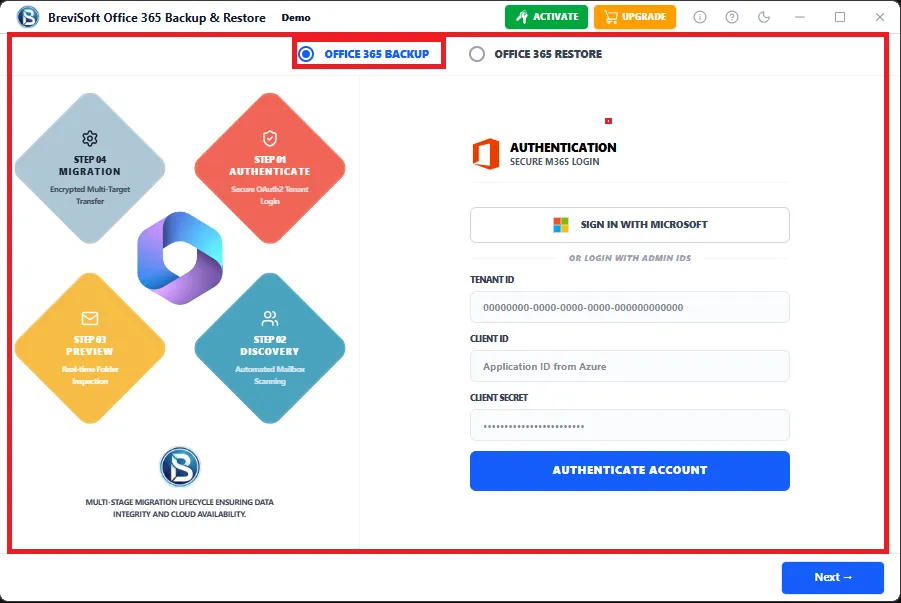
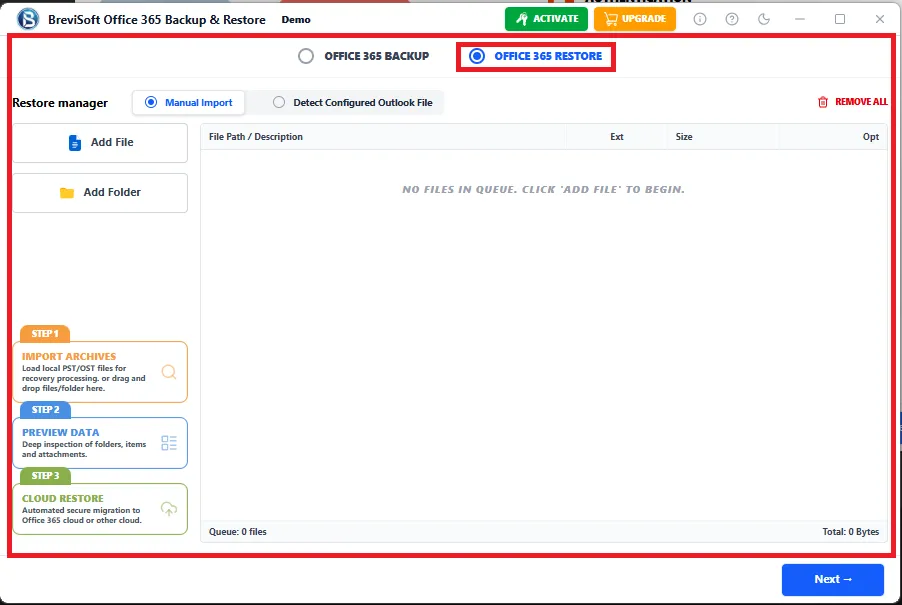
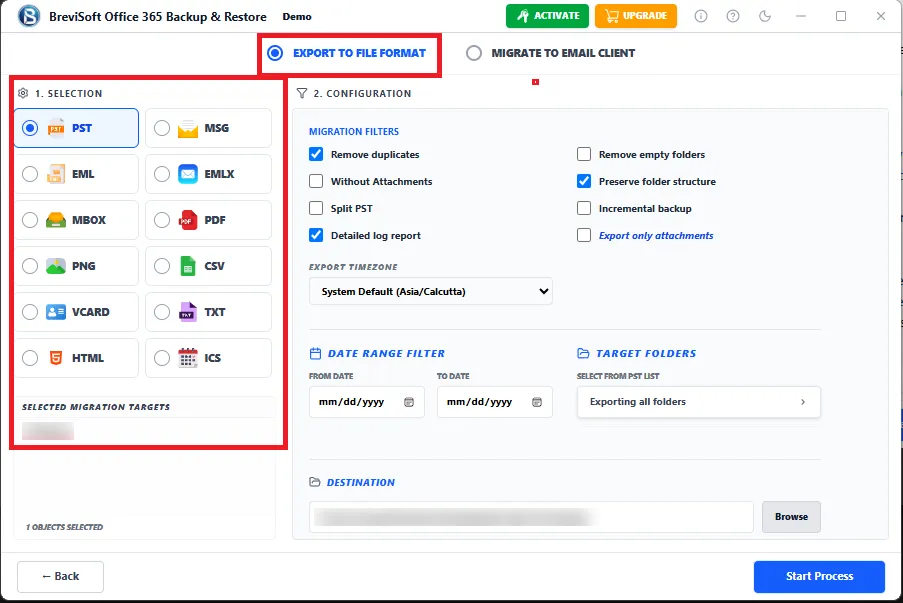
• Export Office 365 mailbox to PST, PDF, MBOX, EMLX, MSG, CSV, HTML, DOC, JSON, ICS, VCF and more.
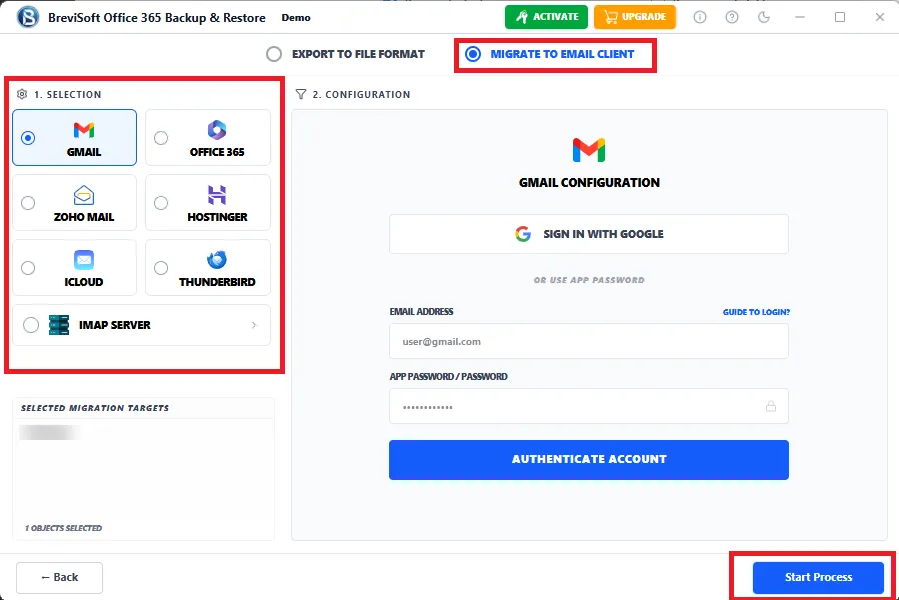
  • Transfer Office 365 emails directly to Another Microsoft 365, IMAP Server, and Gmail Account.
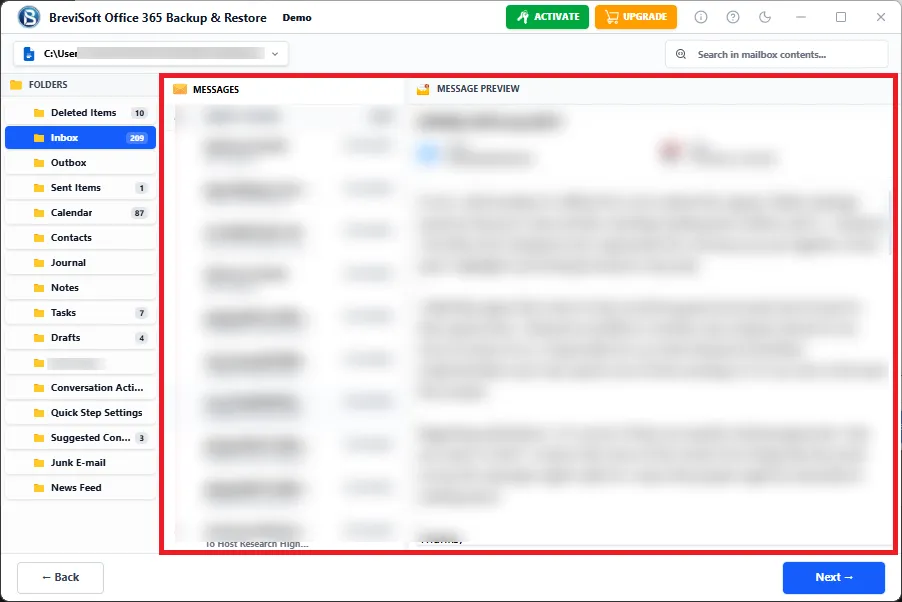
  • Export emails, contacts, calendars, attachments, folders, and mailbox properties without any data loss.
What's new in Office 365 Mailbox Export Tool
v1.0.0
  • Faster Export Engine - High-speed Office 365 mailbox processing
  • Enhanced Cloud Export - Improved Microsoft 365 export
  • Advanced Mail Filters - Better selective mailbox export options
  • Multi-Language Support - Easy installation in multiple languages
1M+ Downloads
190+ Countries Worldwide
15+ Years Experience

Why Choose BreviSoft Office 365 Export Tool?

Secure & Reliable Office 365 Mailbox Export

BreviSoft Office 365 Export Tool is built with enterprise-grade technology to securely export Microsoft 365 mailbox data without modifying the original mailbox. Whether you need to Export Office 365 Emails, contacts, calendars, shared mailboxes, or archive mailboxes, the software preserves folder hierarchy, attachments, email formatting, metadata, and Internet headers throughout the export process. It ensures 100% data integrity, making it the ideal Professional Office 365 Export Software for businesses, IT administrators, and migration professionals.

Multiple Export Formats & Cloud Migration Support

Unlike conventional export utilities, the Office 365 Mailbox Export Tool allows users to export mailbox data into more than 14 industry-standard file formats, including PST, PDF, MBOX, EML, EMLX, MSG, CSV, DOC, HTML, JSON, ICS, VCF, ODT, OTT, and TXT. In addition, the software supports direct migration to Microsoft 365, Google Workspace (G Suite), and Live Exchange Server. This flexibility makes BreviSoft the Best Office 365 Export Tool for backup, migration, compliance, legal discovery, and long-term email archiving.

Advanced Search & Selective Mailbox Export

The integrated search engine helps users quickly locate and export only the required mailbox items instead of processing the entire account. Users can filter data using date range, folder selection, email subject, sender, recipient, attachment availability, and other mailbox attributes. This advanced filtering capability significantly reduces export time while ensuring only relevant data is processed. It is an essential feature for organizations performing audits, legal investigations, or selective Microsoft 365 Mail Export projects.

Designed for Every Microsoft 365 Environment

The BreviSoft Microsoft 365 Export Tool supports almost every Microsoft 365 subscription, including Microsoft 365 Business Basic, Business Standard, Business Premium, Enterprise (E1, E3, E5), Exchange Online, Education, and Government plans. It also exports user mailboxes, shared mailboxes, archive mailboxes, and other supported mailbox types from a single application. With its intuitive interface, multilingual installer, and high-speed processing engine, both technical and non-technical users can Download Office 365 Export Tool and perform mailbox exports with confidence and minimal effort.

Core Benefits of BreviSoft Office 365 Tenant Migration Tool

Benefit
Description
User Benefit
Date Range Filter
Export mailbox items from a specific date range.
Folder Selection
Choose specific folders such as Inbox, Sent, Drafts, Archive, or custom folders.
Eliminates unnecessary mailbox data.
Email Search
Search emails using subject, sender, recipient, or keywords.
Quickly locate important emails.
Attachment Filter
Export emails with or without attachments.
Better storage management and selective export.
Category-Based Export
Export Emails, Contacts, Calendars, and other mailbox items separately.
Complete control over exported data.
Shared Mailbox Export
Export Microsoft 365 Shared Mailboxes directly.
Simplifies team mailbox backup and migration.
Archive Mailbox Export
Download In-Place Archive Mailboxes locally.
Preserve archived business communications.
Maintain Folder Hierarchy
Keeps original mailbox folder structure intact.
Easy navigation after export.
Preserve Metadata
Maintains To, From, Subject, Date, Read/Unread status, and Internet headers.
Ensures data authenticity and compliance.
Duplicate-Free Processing
An intelligent engine minimizes duplicate data exports.
Faster and cleaner mailbox exports.
High-Speed Export Engine
Processes multiple mailbox folders efficiently.
Reduces export time for large mailboxes.
Bulk Mailbox Export
Export multiple Office 365 user mailboxes in one operation.
Ideal for enterprise and administrator use.
14+ Export Formats
Save mailbox data into PST, PDF, MBOX, EML, MSG, CSV, HTML, DOC, JSON, ICS, VCF, ODT, OTT, and TXT
Maximum compatibility with email clients and document platforms.
Direct Cloud Export
Export directly to Microsoft 365, Exchange Server, and Google Workspace.
Simplifies cloud-to-cloud migration.
Export Summary Report
Generates a detailed export log after completion.
Helps administrators verify successful exports and troubleshoot if required.


Who Uses BreviSoft Office 365 PST Export Tool?

The BreviSoft Office 365 PST Export Tool is designed for individuals, businesses, educational institutions, and enterprise organizations that need a reliable solution to Export Office 365 Mailbox data securely. Whether you're creating mailbox backups, migrating to another platform, or fulfilling compliance requirements, the software provides a simple and efficient way to export Microsoft 365 data without data loss.

IT Administrators
IT administrators use the Office 365 Export Tool to export user mailboxes, shared mailboxes, and archive mailboxes for backup, migration, and disaster recovery. The software supports bulk mailbox processing, allowing administrators to manage multiple Microsoft 365 accounts efficiently while maintaining complete mailbox integrity and folder hierarchy.
Small & Medium Businesses (SMBs)
Small and medium-sized businesses rely on the Office 365 Mailbox Export Tool to create secure backups of business emails, contacts, and calendars. Regular mailbox exports help organizations protect critical business communication, recover important information, and meet internal data retention policies without requiring complex technical expertise.
Large Enterprises
Large organizations often manage hundreds or thousands of Microsoft 365 accounts. The Microsoft 365 Export Tool enables enterprise administrators to export multiple mailboxes efficiently while preserving metadata, attachments, and folder structures. It is ideal for mergers, acquisitions, tenant restructuring, and enterprise-wide backup strategies.
Legal & Compliance Teams
Legal professionals and compliance officers frequently need to Export Office 365 Emails for litigation support, audits, eDiscovery, and regulatory compliance. The software preserves original email properties, timestamps, Internet headers, and attachments, ensuring exported mailbox data remains authentic and legally admissible.
Managed Service Providers (MSPs)
Managed Service Providers use the Office 365 Export Software to manage mailbox exports for multiple clients. Its ability to support different Microsoft 365 subscription plans, selective exports, and bulk processing helps MSPs deliver secure migration and backup services while reducing project completion time.
Educational Institutions
Schools, colleges, and universities use the Office 365 PST Export Tool to archive faculty, staff, and student mailbox data. Educational organizations benefit from secure mailbox exports during account transitions, graduation cycles, and long-term record retention while maintaining compliance with institutional policies.
Government Organizations
Government departments require secure and accurate mailbox exports for archival, compliance, and public record management. The Professional Office 365 Export Software maintains complete mailbox integrity, making it suitable for handling sensitive communications and official records.
Individual Professionals
Lawyers, accountants, consultants, freelancers, and executives use the Office 365 Email Export Tool to maintain offline backups of important emails, contacts, and calendars. Exporting mailbox data into PST, PDF, or other file formats provides quick access to business communications without relying on an active Microsoft 365 account.

Advanced Features of BreviSoft Microsoft 365 Export Tool

Office 365 Incremental Backup

Export Office 365 Mailbox to 14+ File Formats


The BreviSoft Microsoft 365 Export Tool allows users to export Office 365 mailbox data into more than fourteen industry-standard file formats, including PST, PDF, MBOX, EML, EMLX, MSG, CSV, DOC, HTML, TXT, JSON, ICS, VCF, ODT, and OTT. This flexibility ensures compatibility with multiple email clients, document management systems, and backup solutions.

Direct Export to Microsoft 365, Exchange & Google Workspace

The software supports direct mailbox migration to Microsoft 365, Live Exchange Server, and Google Workspace without requiring intermediate file conversion. This feature simplifies cloud-to-cloud migration, minimizes administrative effort, and ensures a seamless transfer of mailbox data while preserving emails, contacts, calendars, and attachments.

Export Shared & Archive Mailboxes

BreviSoft enables users to export Office 365 Shared Mailboxes and In-Place Archive Mailboxes with complete accuracy. The software maintains folder hierarchy, mailbox permissions, metadata, and archived content, making it an ideal solution for organizations managing shared business communications and long-term email archives.

Office 365 Bulk Backup
Advanced Search & Selective Export

The built-in search and filtering engine allows users to export only the required mailbox data. Apply filters based on date range, sender, recipient, subject, folders, and attachment availability to reduce export time and improve efficiency during backup, compliance, legal discovery, or mailbox management projects.

Preserve Complete Mailbox Structure

During the export process, the software maintains the original folder hierarchy, email formatting, attachments, metadata, read/unread status, timestamps, and Internet headers. This ensures exported mailbox data remains identical to the source mailbox for easy access and future restoration.

Bulk Office 365 Mailbox Export

Designed for enterprise environments, the software supports exporting multiple Office 365 user accounts in a single operation. Bulk processing significantly reduces administrative effort, improves productivity, and allows IT teams to complete large-scale mailbox export projects quickly and efficiently.

Supports All Microsoft 365 Subscription Plans

The Office 365 Export Tool works seamlessly with Microsoft 365 Business Basic, Business Standard, Business Premium, Enterprise (E1, E3, E5), Exchange Online, Education, and Government plans. This broad compatibility makes it suitable for organizations of every size and industry.

High-Speed Export Engine

An optimized export engine processes large Office 365 mailboxes quickly while maintaining data accuracy. Even mailboxes containing thousands of emails and large attachments are exported efficiently, helping organizations reduce downtime during backup and migration operations.

Secure & Read-Only Export Process

The software performs mailbox exports in a completely read-only mode, ensuring no modifications are made to the source Office 365 account. Original mailbox content remains untouched throughout the process, providing a secure and reliable export experience.

Multilingual Installation & User-Friendly Interface

BreviSoft offers a multilingual installer, allowing users to choose their preferred language during installation. Combined with its intuitive interface and step-by-step workflow, both technical and non-technical users can easily export Office 365 mailbox data without requiring advanced expertise.

Detailed Export Report

After every mailbox export, the software generates a comprehensive report containing mailbox details, exported items, processing status, timestamps, and any skipped entries. This report helps administrators verify successful exports, maintain documentation, and troubleshoot issues when necessary.

Enterprise-Grade Data Security

The Best Office 365 Export Tool is built with enterprise-grade security practices to protect sensitive mailbox information throughout the export process. The software processes data locally without unnecessary modifications, ensuring privacy, confidentiality, and compliance with organizational data protection requirements.

BreviSoft Microsoft 365 Mail Export Tool - Software Specification

Software Download

Size: 42.84 MB

Version: 1.0.0

Demo Limitation

Limitations
Trail Limitation: Evaluate the BreviSoft Office 365 Export Tool Free Trial by exporting a limited number of mailbox items per folder. Explore all features, preview results, and upgrade to the full version for unlimited Office 365 mailbox export.

System Specifications

Hard Disk Space
500 MB for installation; at least 20 GB of free space required for backup storage

RAM
4 GB is recommended

Processor
Intel®Core™ 2 Duo CPUE 4600@ 2.40GHz 2.39GHz

Application
Pre-Requisites

Run the tool as Standard/Guest User without asking for admin privilege:

  • If installation has done using Admin User, then all Users of machines can run the tool without Admin rights.
  • If installation has done using Standard User with Run as Admin mode, then all Users of machines can run the tool without Admin rights.
  • If installation has done using Standard User without Admin rights, then only same Standard User can run the tool.

Supported Desktop Operating Systems

  • Windows OS – Windows 7, 8, 8.1, 10 (32-bit & 64-bit), Windows 11 (64-bit)

Supported Microsoft 365 Plans

  • Microsoft 365 Personal, Family, Business Basic, Business Standard, Business Premium, Enterprise (E1, E3, E5), Education, Government

Supported Office
365 Services

  • Outlook Mail, Contacts, Calendars, Tasks, Journals, Notes, Shared Mailboxes, Archive Mailboxes

Installation Languages

  • English, German, French, Spanish, Italian, Portuguese, Dutch, Japanese, Korean, Chinese, Russian & more

FAQs

Electronic Delivery

Instant digital delivery. Download, install, activate, and start backing up IMAP email accounts in minutes.

BreviSoft Microsoft 365 Export Tool: Demo vs Full Version Comparison

Features Demo Version Full Version
Export Office 365 Mailboxes Limited mailbox items Unlimited mailbox export
Export to 14+ File Formats Preview supported Fully supported
Export Emails Limited emails per folder Unlimited emails
Export Contacts Limited Unlimited
Export Calendars Limited Unlimited
Shared Mailbox Export Preview only Complete export
Archive Mailbox Export Preview only Fully supported
Bulk Mailbox Export Not Available Available
Advanced Filters Basic filters All advanced filters
Direct Cloud Export Limited Microsoft 365,Gmail, IMAP Server
Export Report Basic summary Detailed export report
Technical Support & Updates Limited Free updates & Premium Support
Cost Free $50

Why BreviSoft Office 365 Mailbox Export Tool Is Better Than Other Software

Enterprise-Grade Export Accuracy

BreviSoft ensures complete mailbox integrity by preserving folder hierarchy, attachments, metadata, Internet headers, read/unread status, and timestamps throughout the export process.

Multiple Export Formats in One Tool

Unlike many export utilities, BreviSoft supports exporting Office 365 mailbox data into 14+ popular formats including PST, PDF, MBOX, EML, MSG, HTML, DOC, CSV, JSON, ICS, VCF, ODT, OTT, and TXT.

Direct Cloud-to-Cloud Export

Export Office 365 mailboxes directly to Microsoft 365, Google Workspace (G Suite), and Live Exchange Server without requiring additional migration software or manual conversion.

Supports Every Mailbox Type

Export User Mailboxes, Shared Mailboxes, In-Place Archive Mailboxes, and Microsoft 365 mailboxes from one application without switching between multiple tools.

Intelligent Search & Selective Export

Powerful filters allow users to export mailbox data based on date range, folders, sender, recipient, subject, attachments, and other mailbox attributes, reducing processing time significantly.

High-Speed Bulk Processing

The optimized export engine processes multiple Office 365 mailboxes simultaneously, making it ideal for enterprise organizations, managed service providers, and IT administrators.

Compatible with All Microsoft 365 Plans

Works with Microsoft 365 Business, Enterprise (E1, E3, E5), Education, Government, Exchange Online, and Microsoft 365 subscription plans.

Secure Read-Only Processing

The software never modifies the original mailbox during export, ensuring complete data safety and eliminating the risk of accidental mailbox changes.

Simple Interface for Every User

A modern and intuitive interface enables both technical and non-technical users to export Office 365 mailbox data in just a few clicks.

Excellent Value for Businesses

Combining enterprise-grade features, multiple export options, cloud migration capabilities, and premium customer support makes BreviSoft one of the Best Office 365 Export Tool solutions available.

Awards & Ratings – BreviSoft Office 365 Mailbox Export Tool
CNET

CNET Recognized for its secure mailbox export engine, simple interface, multiple export formats, and dependable performance for Microsoft 365 mailbox backup and migration projects.

Software Informer

Software Informer Appreciated for reliable mailbox export capabilities, consistent performance, advanced filtering options, and compatibility with modern Microsoft 365 environments.

Softonic

Softonic Recognized for user-friendly design, fast Office 365 mailbox export, broad file format support, and secure data handling suitable for businesses and individual users.

Software Suggest

Software Suggest Praised for powerful export features, excellent customer satisfaction, enterprise compatibility, responsive technical support, and overall ease of use.

Frequently Asked Questions

It is a professional solution to export Microsoft 365 mailboxes into multiple file formats and cloud platforms while maintaining complete data integrity.

Yes. The software works as an advanced Office 365 PST Export Tool and exports mailboxes directly to PST format.

PST, PDF, MBOX, EML, EMLX, MSG, CSV, HTML, DOC, TXT, JSON, ICS, VCF, ODT, and OTT.

Yes. It exports emails, contacts, calendars, and other supported mailbox items.

Yes. Shared Mailboxes are fully supported.

Yes. The software exports In-Place Archive Mailboxes without data loss.

Yes. The software supports bulk mailbox export for enterprise environments.

Yes. Original folders, subfolders, metadata, and attachments remain intact after export.

Yes. Direct export to Google Workspace, Microsoft 365, and Live Exchange Server is supported.

Business, Enterprise, Exchange Online, Education, and Government subscription plans

No. The software performs a secure read-only export and never changes the source mailbox.

Yes. A free trial is available to evaluate software functionality before purchasing.

Yes. Users can filter mailbox data by date, folders, sender, recipient, subject, and more.

BreviSoft provides enterprise-grade security, bulk processing, direct cloud export, advanced filtering, and support for over 14 export formats.

You can Download Office 365 Export Tool from the official BreviSoft website. Purchase the licensed edition to unlock unlimited mailbox exports, premium support, and all advanced features.

What Customers Are Saying

BreviSoft Office 365 Export Software – Verified Purchase Reviews