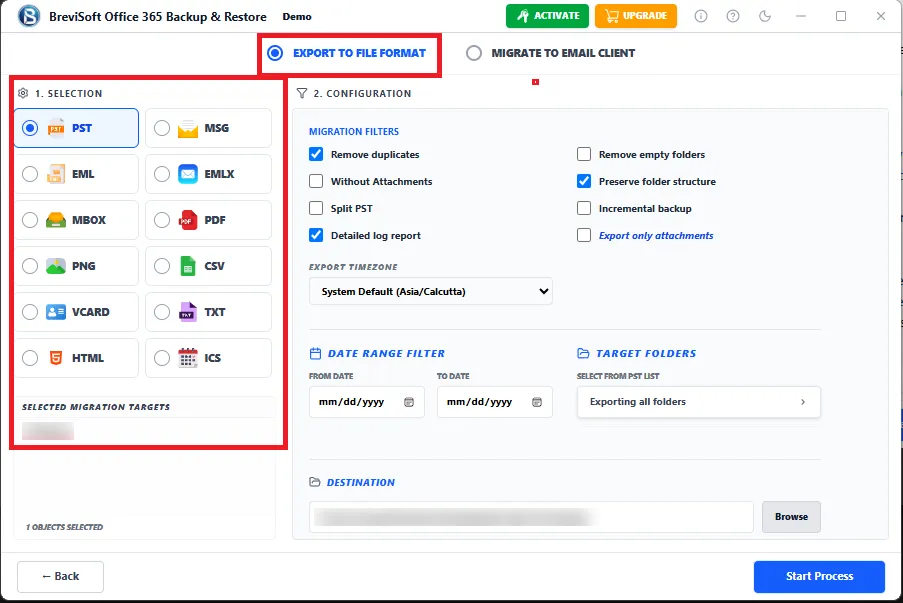
- import OST & PST into Shared, Archive & Public Folder mailboxes.
- Maintains complete mailbox folder hierarchy after migration.
- Supports complete Outlook mailbox migration to Office 365.
BreviSoft provides a direct method to Import PST to Office 365 without complicated Microsoft network upload procedures. The software securely uploads mailbox data directly into Microsoft 365 accounts while preserving emails, attachments, contacts, calendars, folder hierarchy, and metadata. Whether migrating a single mailbox or thousands of PST files, the tool delivers fast, reliable, and accurate results.
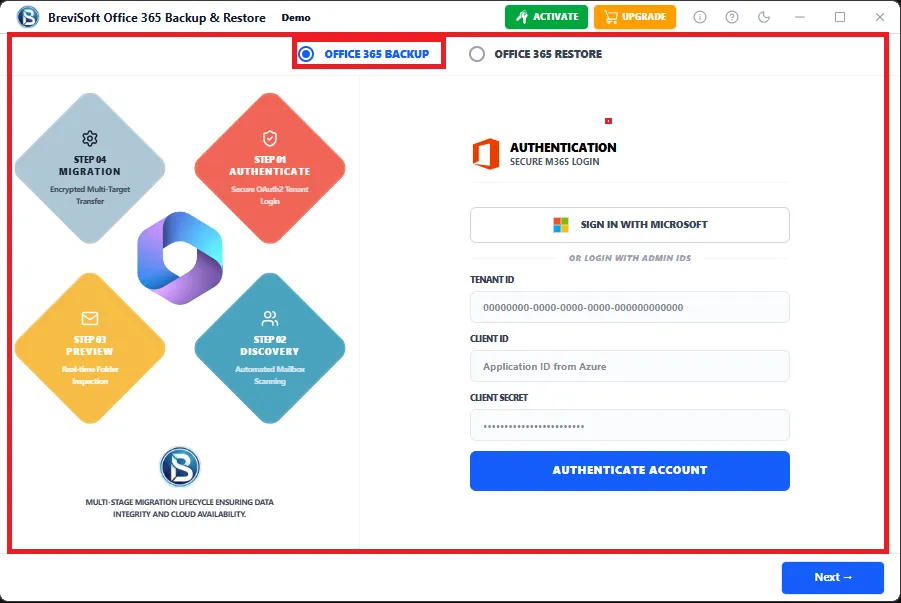
Unlike many traditional Office 365 PST Import Tools, BreviSoft supports Microsoft's Modern Authentication (OAuth 2.0). This advanced security mechanism protects user credentials during migration while ensuring compliance with Microsoft's latest authentication standards. Secure login significantly reduces security risks and enables uninterrupted PST uploads to Exchange Online.
Organizations often need to import multiple PST files to Office 365 during employee onboarding, tenant migration, or mailbox consolidation. BreviSoft supports unlimited PST imports while providing advanced checkbox and date filters for selective migration. Administrators can migrate only required folders or emails, reducing migration time and Office 365 storage usage.
BreviSoft ensures that every mailbox item—including emails, contacts, calendars, attachments, tasks, notes, and metadata—is imported accurately into Microsoft 365. The software maintains original folder hierarchy, sender details, timestamps, and email formatting. Its optimized migration engine delivers high-speed performance even when processing very large Outlook PST files, making it an ideal Bulk PST to Office 365 Import Tool for enterprises.
The BreviSoft PST to Office 365 Import Tool is equipped with advanced search, filtering, and migration capabilities that simplify complex Outlook mailbox imports. Whether you need to Import PST to Office 365, migrate selective emails, or upload multiple Outlook data files, the software provides enterprise-grade performance while preserving complete mailbox integrity.
Smart Mailbox Selection
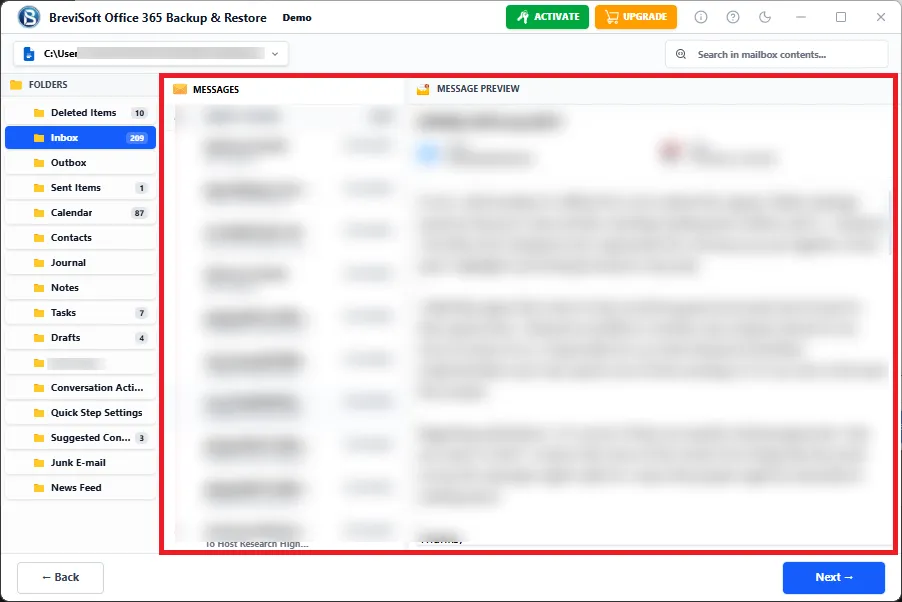
Select specific Outlook folders such as Inbox, Sent Items, Drafts, Contacts, Calendars, Tasks, Notes, or custom folders before migration. This feature prevents unnecessary data transfer and allows users to migrate only the required mailbox content to Microsoft 365.
Advanced Date Range Filter
Import emails created within a selected date range to reduce migration time and Office 365 storage consumption. This option is particularly useful when migrating only recent business communications or archiving historical mailbox data.
Bulk PST File Processing
The software supports importing multiple PST files simultaneously into Office 365 accounts. IT administrators can migrate hundreds of Outlook mailboxes in a single operation without repeating manual steps, making enterprise migrations faster and more efficient.
Automatic Mailbox Mapping
BreviSoft automatically maps Outlook PST data with the destination Microsoft 365 mailbox, reducing manual configuration and minimizing migration errors while ensuring accurate mailbox synchronization.
Maintains Complete Data Integrity
Every email, attachment, contact, calendar event, task, note, folder hierarchy, and mailbox property is preserved throughout the migration process without altering the original PST file.
Secure Microsoft Modern Authentication
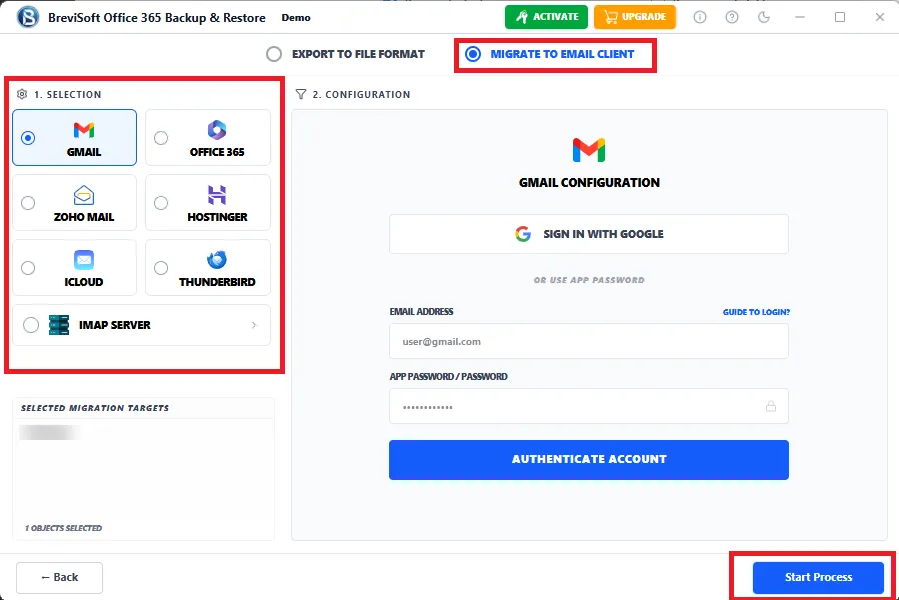
Authenticate directly with Microsoft OAuth 2.0 to securely connect Office 365 accounts. The software supports the latest Microsoft authentication standards without relying on deprecated basic authentication methods.

Directly upload Outlook PST files to Office 365 and Microsoft 365 mailboxes without complex manual procedures. The software connects securely using Microsoft Modern Authentication and imports mailbox data while preserving folder hierarchy, email formatting, attachments, contacts, calendars, and metadata for a seamless migration experience.

Import multiple PST files into Office 365 simultaneously without repeating the migration process for each mailbox. The bulk migration engine significantly reduces administrative effort and saves valuable time during enterprise-level Outlook mailbox migration projects involving hundreds or thousands of users.

BreviSoft allows users to import PST files into Office 365 Shared Mailboxes, Online Archive Mailboxes, and Public Folders. This flexibility enables organizations to migrate collaborative mailboxes and archived business communications while maintaining accessibility across Microsoft 365 environments.

Unlike traditional migration methods, BreviSoft performs Outlook PST migration without requiring Microsoft Outlook on the system. Users can upload mailbox data directly into Microsoft 365 accounts, reducing software dependency and simplifying deployment across multiple Windows computers.

The software supports Microsoft's latest OAuth 2.0 authentication protocol to establish secure connections with Office 365. Users can safely authenticate their Microsoft accounts while eliminating security risks associated with deprecated basic authentication methods.

BreviSoft maintains every mailbox property throughout the migration process, including sender details, recipient information, timestamps, read/unread status, attachments, folder hierarchy, categories, importance flags, and internet message headers for complete mailbox integrity.

The built-in date filter allows users to migrate mailbox items within a selected time period. This feature helps organizations move only required emails while excluding unnecessary historical data, resulting in faster migration and optimized Microsoft 365 storage utilization.

Choose specific Outlook folders before starting the migration. Users can import Inbox, Sent Items, Contacts, Calendars, Drafts, Tasks, Notes, Deleted Items, or custom folders individually instead of migrating the entire Outlook mailbox.

BreviSoft efficiently processes very large Outlook PST files without file size restrictions. The optimized migration engine ensures stable performance, making it suitable for importing enterprise mailboxes containing several gigabytes of Outlook data.

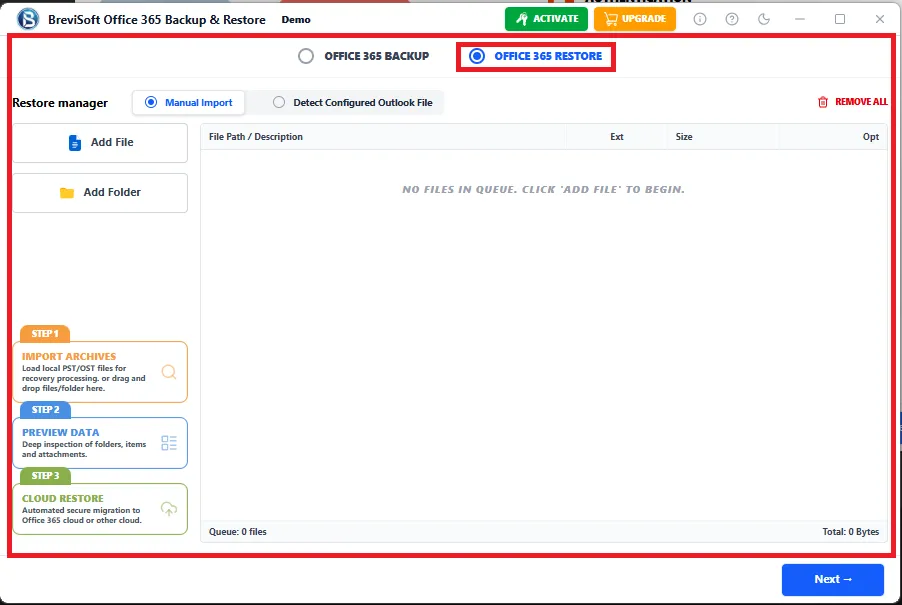
Besides PST files, the software also imports Outlook OST files into Microsoft 365 mailboxes. This dual compatibility enables organizations to migrate data from both Outlook storage formats using a single migration solution.

The installer supports multiple international languages, allowing users to install and operate the software in their preferred language. This feature improves accessibility for global businesses and multinational organizations deploying Microsoft 365 worldwide.

BreviSoft is fully compatible with Windows 11, Windows 10, Windows 8.1, Windows 8, Windows 7, and Windows Server editions. Users can easily install the software on both desktop and server environments for secure Outlook mailbox migration.
Complete System Requirements and Technical Specifications for PST to Microsoft 365 Import Tool
Demo Limitation
Limitations
The trial version of BreviSot Office 365 PST Import Tool imports a limited number of items per folder from each PST file. Upgrade to the full version to import unlimited PST files and complete mailbox data without restrictions.
System Specifications
Hard Disk Space
500 MB for installation; at least 20 GB of free space required for backup storage
RAM
4 GB is recommended
Processor
Intel®Core™ 2 Duo CPUE 4600@ 2.40GHz 2.39GHz
Application
Pre-Requisites
Run the tool as Standard/Guest User without asking for admin privilege:
Supported Desktop Operating Systems
Supported Microsoft 365 Plans
Supported Office
365 Services
Installation Languages
FAQs
Electronic Delivery
Instant digital delivery. Download, install, activate, and start backing up IMAP email accounts in minutes.
| Features | Demo Version | Full Version |
|---|---|---|
| Import PST to Office 365 | 25 Items Per Folder | Unlimited Import |
| Number of PST Files | Limited | Unlimited |
| Import PST Emails | Limited Items | Complete Import |
| Import Contacts | Limited Items | Complete Import |
| Import Calendar | Limited Items | Complete Import |
| Import to Shared Mailboxes | Limited Items | Complete Import |
| Import to Archive Mailboxes | Limited Items | Complete Import |
| Import to Public Folders | Limited Items | Complete Import |
| Microsoft Modern Authentication | Available | Available |
| Preserve Attachments & Metadata | Preview | Complete Preservation |
| Technical Support & Updates | Free Support & Updates | Free Support & Updates |
| Cost | Free | $50 |
Direct Office 365 Import without Outlook
Unlike many traditional PST Import Tools, BreviSoft allows you to Import PST to Office 365 without Outlook installation. This saves time, reduces software dependencies, and simplifies the migration process for both home users and enterprise administrators.
Supports Every Office 365 Mailbox Type
Most migration tools only support standard mailboxes. BreviSoft imports PST files into Primary Mailboxes, Shared Mailboxes, Archive Mailboxes, and Public Folders, making it a complete Office 365 Mailbox Import Tool for organizations of every size.
Secure Microsoft Modern Authentication
The software uses Microsoft's OAuth 2.0 Modern Authentication to establish a secure connection with Microsoft 365 accounts. User credentials remain protected while ensuring compatibility with Microsoft's latest security standards.
Bulk PST Import Engine
BreviSoft supports Import Multiple PST Files to Office 365 simultaneously. IT administrators can migrate hundreds or thousands of Outlook mailboxes in one operation, significantly reducing migration time.
Maintains Complete Mailbox Integrity
Every email, attachment, contact, calendar, task, note, folder hierarchy, read/unread status, internet headers, timestamps, and metadata are preserved exactly as stored in the original Outlook PST file.
Smart Selective Migration
Supports Users can migrate only selected mailbox folders or use the built-in date filter to import required emails. This reduces Office 365 storage usage and minimizes unnecessary mailbox migration.
Supports Large PST Files
Many tools struggle with oversized Outlook data files. BreviSoft is optimized to process and upload large PST files without splitting or corruption, ensuring reliable enterprise mailbox migration.
Faster Migration Performance
The advanced migration engine efficiently processes Outlook mailbox data, reducing migration time while maintaining data accuracy. Bulk processing capabilities make it suitable for enterprise-level deployments.
User-Friendly Interface
The software features a modern, intuitive interface suitable for both technical and non-technical users. Simple step-by-step navigation eliminates the complexity often associated with Outlook mailbox migration.
Excellent Windows Compatibility
BreviSoft supports Windows 11, Windows 10, Windows 8.1, Windows 8, Windows 7, and Windows Server editions, ensuring seamless deployment across business environments.
Organizations looking to import PST files to Office 365 have three primary options: BreviSoft Office 365 PST Import Tool, Microsoft Network Upload (AzCopy), and Microsoft Drive Shipping. The table below compares each method based on setup, features, advantages, limitations, and ideal use cases.

CNET BreviSoft PST to Office 365 Import Tool is recognized for its simple interface, secure migration process, and accurate mailbox import capabilities. Editors appreciate its ability to migrate Outlook PST files to Microsoft 365 while preserving attachments, metadata, and folder hierarchy.

Software Informer recognizes BreviSoft for its stable performance, advanced filtering options, and support for Shared Mailboxes, Archive Mailboxes, and Public Folders. Its enterprise-ready features make it a preferred solution for Outlook mailbox migration.

Softonic highlights BreviSoft for providing an easy and secure method to Import PST to Office 365. The software's Modern Authentication support, bulk migration engine, and Windows compatibility make it suitable for businesses and individual users.

Software Suggest appreciates BreviSoft's comprehensive migration capabilities, responsive customer support, and reliable Office 365 import engine. Users value its accuracy, performance, and ability to migrate large Outlook PST files without data loss.
BreviSoft is a professional PST to Office 365 Import Tool that securely imports Outlook PST files into Microsoft 365 mailboxes while preserving emails, contacts, calendars, attachments, and metadata.
Yes. The software allows you to Import PST to Office 365 without Outlook installation.
Yes. It supports both Office 365 and Microsoft 365 business accounts.
Yes. The software supports Bulk PST to Office 365 Import Tool functionality.
Yes. Emails, attachments, embedded images, and formatting remain unchanged.
Yes. Original Outlook folder hierarchy remains intact after migration.
Yes. Archive PST files can be imported directly into Online Archive Mailboxes.
Yes. Shared Mailboxes are fully supported.
Yes. The software supports Office 365 Public Folder migration.
Yes. OAuth 2.0 authentication is fully supported.
Yes. The software is optimized for importing large Outlook PST files.
Yes. Folder selection and Date Filter options are available.
No. Outlook is not required to import PST files.
Windows 11, 10, 8.1, 8, 7, and Windows Server editions.
Yes. A demo version is available to evaluate the software before purchasing.
Yes. Contacts, calendars, tasks, notes, journals, and emails are all supported.
No. The software performs a safe, read-only migration and never alters the source PST file.
Yes. Sender, recipient, subject, timestamps, read status, categories, and internet headers remain intact.
We migrated more than 700 Outlook mailboxes using the BreviSoft Office 365 PST Import Tool. The migration completed successfully with complete folder hierarchy and attachments preserved. The bulk import feature saved our team several days of manual work.
This is one of the most reliable tools to Import PST to Office 365. Modern Authentication worked perfectly, and the software handled multiple PST files without any issues. I highly recommend it for enterprise migrations.
We needed to import several archive PST files into Microsoft 365 Online Archive mailboxes. BreviSoft completed the migration accurately while maintaining every email property and folder structure.
I was looking for a way to Import PST to Office 365 without Outlook, and BreviSoft made the entire process incredibly easy. The interface is simple, and the migration finished much faster than expected.
The software imported multiple Outlook PST files simultaneously with zero data loss. Attachments, calendars, contacts, and mailbox hierarchy remained exactly the same after migration. Excellent product and responsive support team.