• Transfer complete mailboxes between IMAP-supported email accounts while preserving folders, attachments, and email properties.
  • Easily migrate IMAP emails to Microsoft 365, Exchange Server, or Google Workspace with a secure and straightforward process.
  • Works seamlessly with Gmail, Outlook, Yahoo Mail, iCloud, Zoho Mail, AOL Mail, Fastmail, ProtonMail, and many other IMAP-enabled email providers.

What's new in BreviSoft IMAP Migration Tool
v1.0.0
  • Faster Bulk IMAP Mailbox Migration Engine
  • Improved Concurrent IMAP Migration Speed
  • Enhanced Secure Authentication Support
  • Better Multi-language User Interface
1M+ Downloads
190+ Countries Worldwide
15+ Years Experience

Why Choose BreviSoft IMAP Migration Tool?

Discover why businesses and IT professionals rely on BreviSoft for fast, secure, and reliable IMAP email migration.

Secure and Reliable IMAP Email Migration

BreviSoft IMAP Migration Tool is built to make email migration simple, secure, and dependable. Whether you need to migrate a single mailbox or perform a bulk IMAP mailbox migration for an organization, the software transfers emails directly between IMAP-enabled accounts without modifying the original data. It preserves email integrity throughout the migration process, ensuring that messages, attachments, and mailbox structure remain exactly as they were.

Supports All Major IMAP Email Services

The IMAP Mail Migration software is compatible with a wide range of IMAP-enabled email providers, making it an ideal choice for both personal and business users. You can migrate emails between Gmail, Outlook, Yahoo Mail, iCloud, AOL Mail, Zoho Mail, Fastmail, ProtonMail (via Bridge), Rackspace, IONOS, GoDaddy Workspace Email, Bluehost, HostGator, DreamHost, Namecheap Private Email, and many other email services. This flexibility allows you to switch email platforms without worrying about compatibility issues.

Save Time with Bulk and Smart Migration Options

BreviSoft IMAP Email Transfer Tool simplifies large-scale email transfers by allowing you to migrate multiple IMAP accounts in a single operation. Built-in filters let you migrate only the emails you need based on date or folders, reducing migration time and unnecessary data transfer. The software also supports pause and resume functionality, making it convenient to continue long migration tasks without starting over.

Preserves Complete Mailbox Structure

Maintaining mailbox organization is essential during email migration. BreviSoft IMAP Email Migrator ensures that folder hierarchy, email formatting, attachments, read and unread status, sender and recipient details, timestamps, and other email metadata remain unchanged after migration. This allows users to access their migrated mailbox in the same organized way as the original account, eliminating the need for manual rearrangement.

Advanced Search & Migrate Feature – BreviSoft IMAP Migration Tool

Find and migrate only the emails you need using advanced date, folder, and mailbox filters for faster migration.

Date-Based Email Migration

Filter emails by a specific date range to migrate only recent or required messages. This feature is useful when archiving old emails, moving project-specific communications, or transferring data for compliance purposes without migrating the entire mailbox.

Folder-Wise IMAP Migration

Select one or multiple folders for migration instead of transferring the complete mailbox. Whether you need to migrate Inbox, Sent Items, Drafts, Archive, or custom folders, the software gives you complete control over the migration process.

Bulk IMAP Account Migration

Migrate multiple IMAP accounts in a single operation by adding several user credentials. This feature is ideal for organizations, managed service providers (MSPs), and IT administrators handling large-scale email migration projects.

Preserve Complete Mailbox Information

Every migration maintains the original mailbox structure, including folder hierarchy, email formatting, attachments, sender and recipient details, timestamps, read/unread status, and other email properties. Users can continue working with their mailbox exactly as it appeared before migration.

Smart Duplicate Email Handling

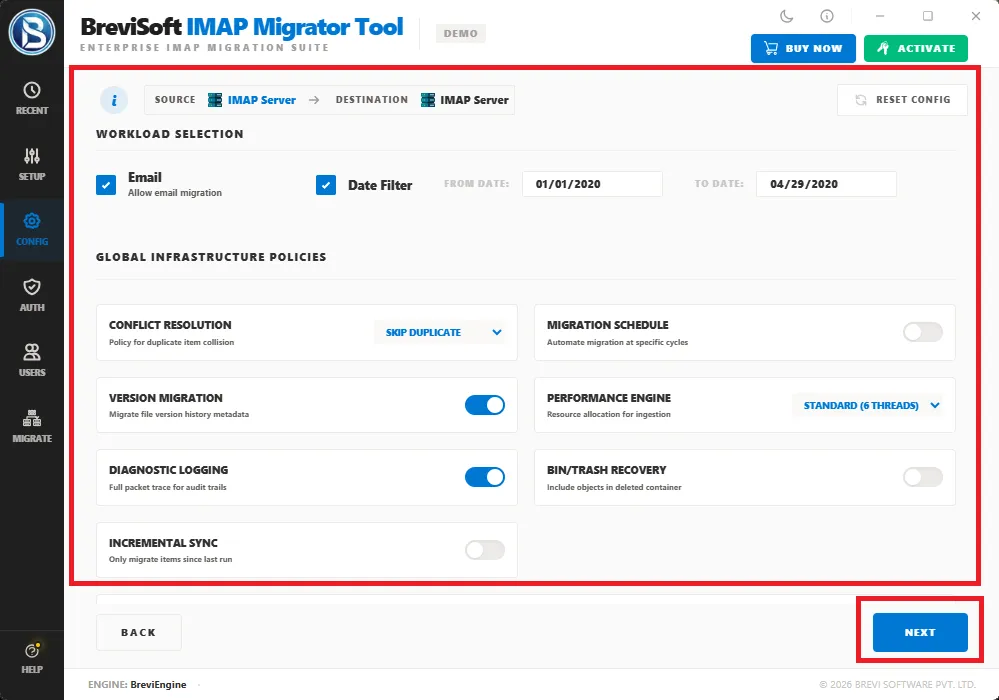
To avoid unnecessary data transfer, the software intelligently skips duplicate emails that already exist in the destination mailbox. This saves migration time, prevents duplicate messages, and keeps the destination account organized.

Pause and Resume Migration

Long-running migration jobs can be paused whenever required and resumed later from the same point. This provides greater flexibility during large mailbox migrations without restarting the entire process.

Concurrent Mailbox Processing

The software processes multiple mailbox connections simultaneously, helping reduce the overall migration time. This is especially beneficial for businesses migrating several employee mailboxes at once.

Detailed Migration Report

Once the migration is complete, BreviSoft generates a detailed report showing migrated accounts, processed folders, successful transfers, skipped items, and any errors encountered. This report helps administrators verify and document the migration process.

Who Uses BreviSoft IMAP Migration Tool?

Trusted by professionals and organizations to migrate IMAP mailboxes quickly, securely, and without data loss.

Home Users
Individuals switching from one email service to another can easily migrate their personal emails without technical knowledge. The software helps transfer complete mailboxes, including folders and attachments, while keeping everything organized in the destination account.
Small & Medium Businesses (SMBs)
Businesses often migrate email accounts when changing hosting providers or upgrading to a new email platform. BreviSoft helps organizations move employee mailboxes quickly while minimizing downtime and ensuring business communications remain intact throughout the migration.
IT Administrators
IT professionals can use the software to migrate multiple IMAP accounts from a centralized interface. Features such as batch migration, selective folder migration, and migration reports simplify mailbox management and reduce the effort required for large-scale migration projects.
Managed Service Providers (MSPs)
MSPs responsible for client email migrations can securely transfer multiple customer mailboxes between different IMAP servers. The software supports a wide range of email providers, making it suitable for handling migration projects across various business environments.
Corporate & Enterprise Organizations
Large organizations frequently migrate email systems due to infrastructure upgrades, mergers, acquisitions, or cloud adoption. BreviSoft supports bulk mailbox migration, helping enterprises transfer numerous employee accounts efficiently while preserving folder hierarchy, attachments, and email metadata.
Educational Institutions
Schools, colleges, and universities often migrate faculty and student email accounts when adopting new email services such as Google Workspace or Microsoft 365. The software enables administrators to transfer multiple mailboxes securely while maintaining the existing mailbox structure.
Government & Public Sector Organizations
Government departments and public institutions require reliable email migration tools that maintain data integrity. BreviSoft provides a secure migration process that helps preserve important email records and mailbox organization during server or platform changes.
Email Hosting Providers
Hosting companies and email service providers can use BreviSoft to assist customers in moving email accounts from one IMAP server to another. Its broad compatibility with popular IMAP-enabled services makes migrations faster and easier to manage.
Legal, Healthcare & Financial Firms
Organizations that handle sensitive communications need a dependable migration solution. BreviSoft transfers emails securely while preserving important email information such as timestamps, sender and recipient details, attachments, and folder structure, helping maintain accurate business records.
Anyone Migrating to a New Email Platform
Whether you're moving to Google Workspace, Microsoft 365, Exchange Server, or another IMAP-enabled email service, BreviSoft offers a simple and reliable solution for transferring emails without losing important mailbox data or organization. It is suitable for both one-time migrations and ongoing business requirements.

Advanced Features of BreviSoft IMAP Migration Tool

Discover advanced features that make IMAP email migration faster, more secure, and effortless across all IMAP-enabled email services.

Direct IMAP to IMAP Migration

Direct IMAP to IMAP Migration


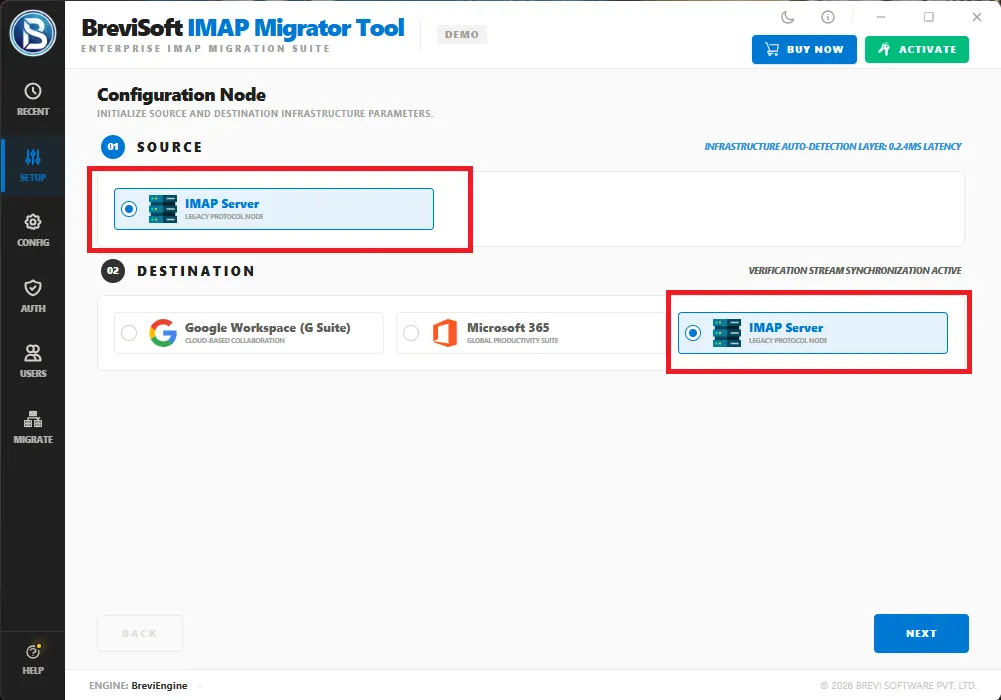
BreviSoft IMAP Migration Tool allows you to migrate IMAP emails directly from one IMAP-enabled email account to another without creating intermediate files. The software establishes a secure connection between both accounts and transfers mailbox data efficiently while preserving folders, attachments, and email properties throughout the migration process.

Batch IMAP Mailbox Migration

Perform Batch IMAP Migration by transferring multiple user mailboxes in a single operation. This feature is ideal for businesses, IT administrators, and managed service providers who need to migrate several employee accounts simultaneously, reducing manual effort while improving productivity and overall migration speed.

Supports 20+ IMAP Email Services

BreviSoft IMAP Migration Software is compatible with popular email providers such as Gmail, Outlook, Yahoo Mail, iCloud, AOL Mail, Zoho Mail, Fastmail, ProtonMail, Microsoft 365, Exchange Online, and many hosting-based email platforms, providing a flexible solution for virtually any IMAP email migration requirement.

Selective IMAP Email Migration

The built-in filtering options let you perform Selective IMAP Migration by choosing specific folders or defining a custom date range. Instead of transferring the entire mailbox, you can migrate only the required emails, saving valuable time and reducing unnecessary data movement.

Maintains Complete Mailbox Structure

During IMAP Mailbox Migration, the software preserves folder hierarchy, email formatting, attachments, read and unread status, sender and recipient information, timestamps, and other important mailbox properties. This ensures your destination mailbox looks and functions exactly like the original account.

Pause and Resume Migration Anytime

Large IMAP Email Migration projects can be paused whenever required and resumed later without restarting the process. This feature is especially useful for lengthy migrations, allowing administrators to continue mailbox transfers from the same point with minimal interruption.

Faster Concurrent Mailbox Processing

BreviSoft supports Concurrent IMAP Migration, allowing multiple mailbox connections to be processed simultaneously. This significantly reduces migration time for organizations moving numerous employee accounts while maintaining reliable performance and consistent data accuracy throughout the transfer.

Secure IMAP Account Authentication

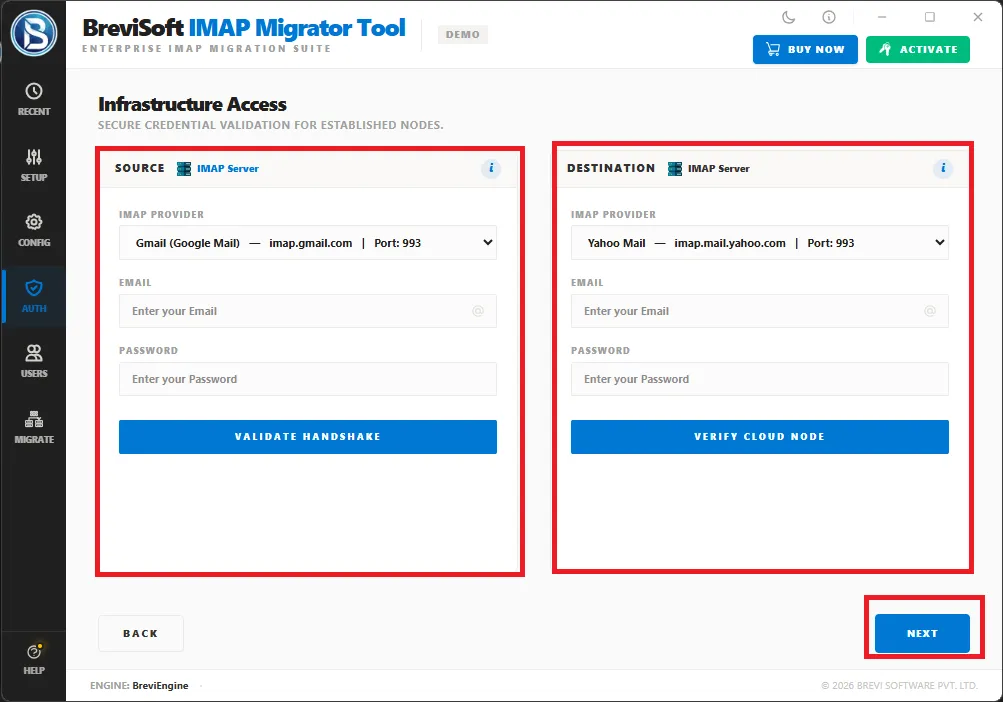
Security is a priority during every IMAP Account Migration. The software uses secure authentication methods supported by modern IMAP email providers, protecting account credentials and ensuring that mailbox data is transferred safely without compromising user privacy.

Smart Duplicate Email Detection

The software intelligently identifies duplicate messages during IMAP Email Transfer and skips emails that already exist in the destination mailbox. This helps prevent duplicate data, reduces migration time, and keeps the destination account clean and well organized.

Multi-Language User Interface

BreviSoft IMAP Migration Tool includes a multilingual installer that allows users to select their preferred language before launching the software. Its intuitive interface makes email migration easy for both technical professionals and first-time users across different regions.

Detailed Migration Report

After every IMAP Data Migration, the software generates a comprehensive migration report containing transferred mailboxes, processed folders, skipped items, successful transfers, and error details. These reports help administrators verify migration results and maintain accurate project documentation.

Simple Wizard-Based Migration Process

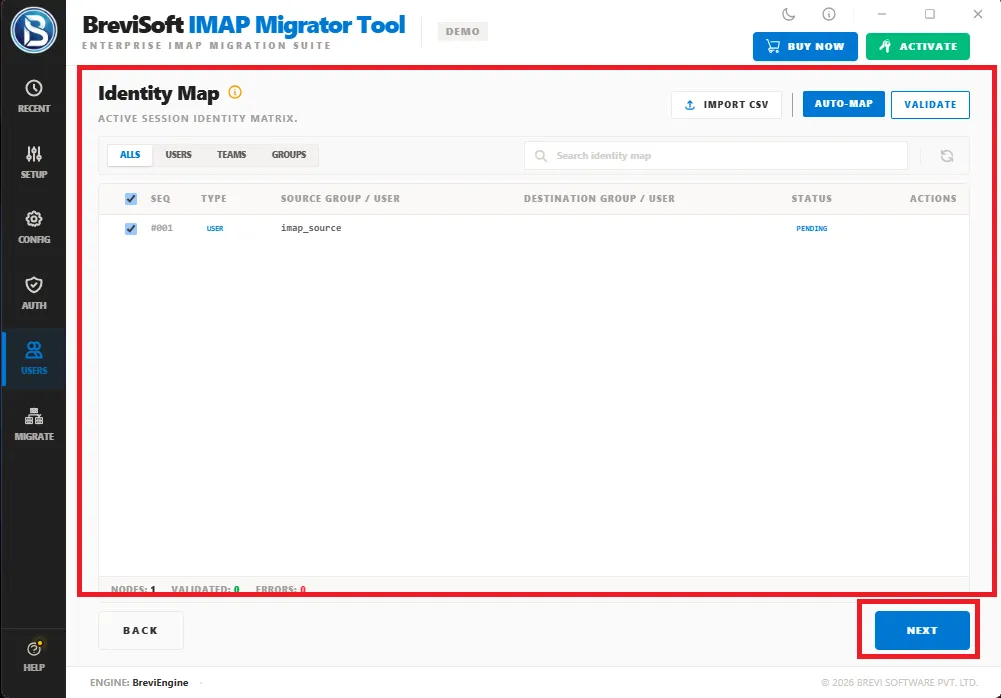
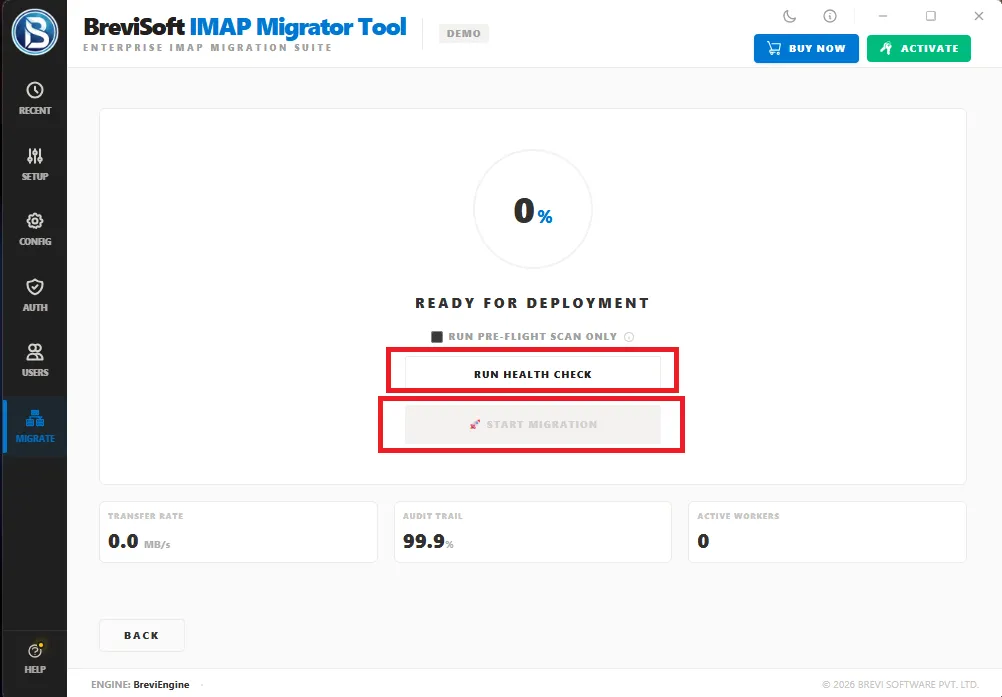
The step-by-step wizard makes IMAP Email Migration straightforward for users of all experience levels. From connecting source and destination accounts to selecting folders and starting the migration, every stage is clearly guided, eliminating the need for advanced technical knowledge while ensuring accurate results.

Migrate IMAP Emails to Cloud & Enterprise Platforms

Easily migrate IMAP emails to Google Workspace (G Suite), Microsoft (Office) 365, and Live Exchange Server using a secure and streamlined migration process. BreviSoft transfers complete mailbox data, including folders, attachments, and email properties, helping organizations move to modern cloud and enterprise email platforms with minimal effort.

Universal IMAP Server Compatibility

BreviSoft IMAP Migration Software is compatible with virtually all IMAP-enabled email services, allowing you to migrate emails between Gmail, Outlook, Yahoo Mail, iCloud, AOL Mail, Zoho Mail (including Zoho EU), ProtonMail (via Bridge), Fastmail, GMX Mail, Mail.com, Yandex Mail, Rackspace Email, Bluehost, HostGator, GoDaddy Workspace Email, DreamHost, Namecheap Private Email, and many more without compatibility issues.

IMAP to IMAP Migration Software - Specification

Everything you need to know about software compatibility and technical requirements

Software Download

Size: 14.17 MB

Version: 1.0.0

Demo Limitation

Limitations
The Trial Version of BreviSoft IMAP Migration Tool allows you to evaluate all major features before purchasing. You can migrate up to 50 emails per folder while preserving folder hierarchy, attachments, and email properties. Upgrade to the Full Version for unlimited migration.

System Specifications

Hard Disk Space
500 MB for installation; at least 20 GB of free space required for backup storage

RAM
4 GB is recommended

Processor
Intel®Core™ 2 Duo CPUE 4600@ 2.40GHz 2.39GHz

Application
Pre-Requisites

Run the tool as Standard/Guest User without asking for admin privilege:

  • If installation has done using Admin User, then all Users of machines can run the tool without Admin rights.
  • If installation has done using Standard User with Run as Admin mode, then all Users of machines can run the tool without Admin rights.
  • If installation has done using Standard User without Admin rights, then only same Standard User can run the tool.

Supported Desktop Operating Systems

  • Windows OS – Windows 7, 8, 8.1, 10 (32-bit & 64-bit), Windows 11 (64-bit)

Supported Microsoft 365 Plans

  • Microsoft 365 Personal, Family, Business Basic, Business Standard, Business Premium, Enterprise (E1, E3, E5), Education, Government

Supported Office
365 Services

  • Outlook Mail, Contacts, Calendars, Tasks, Journals, Notes, Shared Mailboxes, Archive Mailboxes

Installation Languages

  • English, German, French, Spanish, Italian, Portuguese, Dutch, Japanese, Korean, Chinese, Russian & more

FAQs

Electronic Delivery

Instant digital delivery. Download, install, activate, and start backing up IMAP email accounts in minutes.

BreviSoft IMAP Migration Tool: Demo vs Full Version Comparison

Compare the Demo and Full versions to choose the right edition for unlimited, secure, and feature-rich IMAP migration.

Features Demo Version Full Version
IMAP Email Migration Limited emails per folder Unlimited email migration
Batch IMAP Migration Limited accounts Unlimited accounts
Google Workspace, M365 & Exchange Migration Limited transfer Unlimited migration
All IMAP Email Services Supported Fully supported
Selective Migration Limited Unlimited
Attachments & Metadata Preserved Fully preserved
Folder Hierarchy Maintained Maintained
Incremental Migration Available Available
Pause & Resume Supported Supported
Cost Free $39

Why BreviSoft IMAP Migration Tool Is Better Than Other Software

Discover the features that make BreviSoft a trusted choice for fast, secure, and hassle-free IMAP email migration.

Direct IMAP-to-IMAP Migration

Transfer emails directly between IMAP-enabled accounts without exporting or importing intermediate files, making the migration process faster and more convenient.

Broad IMAP Server Compatibility

Supports Gmail, Outlook, Yahoo Mail, iCloud, Zoho Mail, Microsoft 365, Exchange Server, and many other IMAP-enabled email services from a single platform.

Bulk Mailbox Migration

Migrate multiple IMAP accounts simultaneously, making it an ideal solution for businesses, IT administrators, and managed service providers.

Preserves Complete Mailbox Data

Maintains folder hierarchy, attachments, email formatting, read/unread status, and metadata to ensure an accurate mailbox migration.

Smart Selective Migration

Transfer only the required emails using date range and folder filters, helping reduce migration time and unnecessary data transfer.

Incremental Migration Support

Transfers only newly added emails during subsequent migrations, avoiding duplicates and improving synchronization efficiency.

Secure Authentication

Uses secure login methods supported by modern IMAP email providers to protect account credentials and mailbox data.

Fast & Reliable Performance

Optimized migration engine delivers faster email transfers while maintaining data accuracy, even for large mailboxes.

Easy-to-Use Interface

Simple step-by-step wizard allows both technical and non-technical users to complete IMAP email migration with ease.

Free Demo Available

Evaluate all major features before purchasing by using the free demo version with limited email migration.

Awards & Ratings – BreviSoft IMAP Migration Tool

Recognized for reliable performance, user-friendly design, and secure email migration by leading software review platforms.

CNET

CNET BreviSoft IMAP Migration Tool has been recognized for its intuitive interface, reliable IMAP email migration capabilities, and consistent performance, making it a dependable choice for both business and individual users.

Software Informer

Software Informer appreciates the tool for its secure migration process, broad IMAP server compatibility, and ability to preserve mailbox structure, attachments, and email properties during migration.

Softonic

Softonic highlights BreviSoft IMAP Migration Tool for its simple user experience, efficient bulk mailbox migration, and compatibility with popular IMAP-enabled email services.

Software Suggest

Software Suggest recognizes BreviSoft IMAP Migration Tool as a practical solution for organizations and professionals seeking secure, accurate, and hassle-free email migration between IMAP accounts.

Frequently Asked Questions

BreviSoft IMAP Migration Tool is a professional solution that helps you migrate emails from one IMAP-enabled email account to another while preserving folders, attachments, and email properties.

The software supports Gmail, Outlook, Yahoo Mail, iCloud, AOL Mail, Zoho Mail, Microsoft 365, Exchange Server, Fastmail, ProtonMail (via Bridge), and many other IMAP-enabled email services.

Yes. The software allows you to migrate IMAP emails directly to Microsoft (Office) 365, Google Workspace (G Suite), and Live Exchange Server.

Yes. It performs direct IMAP-to-IMAP migration between supported email accounts without requiring intermediate file conversion.

Yes. The Batch IMAP Migration feature lets you migrate multiple user mailboxes simultaneously, saving time during large migration projects.

Yes. The software preserves the original folder hierarchy, email formatting, attachments, read/unread status, and other mailbox properties

Absolutely. All email attachments are transferred along with the corresponding messages without altering the original content.

Yes. You can migrate specific folders or filter emails by date to transfer only the required mailbox data.

No. The software performs a secure migration process while maintaining the integrity of your mailbox data and email metadata.

Yes. You can pause an ongoing migration and resume it later without restarting the entire process.

Yes. Incremental Migration transfers only newly added emails during subsequent migration sessions, avoiding duplicate data.

Yes. You can download the demo version to evaluate the software's features before purchasing the full version.

Yes. It is designed for home users, businesses, IT administrators, managed service providers, and enterprise organizations.

BreviSoft IMAP Migration Tool is compatible with all recent versions of Windows, including Windows 11, 10, 8.1, 8, and 7.

BreviSoft offers direct IMAP email migration, batch mailbox transfer, broad IMAP server compatibility, selective migration options, secure authentication, and an easy-to-use interface, making it a reliable solution for both personal and business email migration.

What Customers Are Saying

BreviSoft IMAP Migration Tool – Verified Purchase Reviews