- Export Multiple EML Emails in a Single Process
- Maintains Complete Data Integrity of EML Messages During Conversion
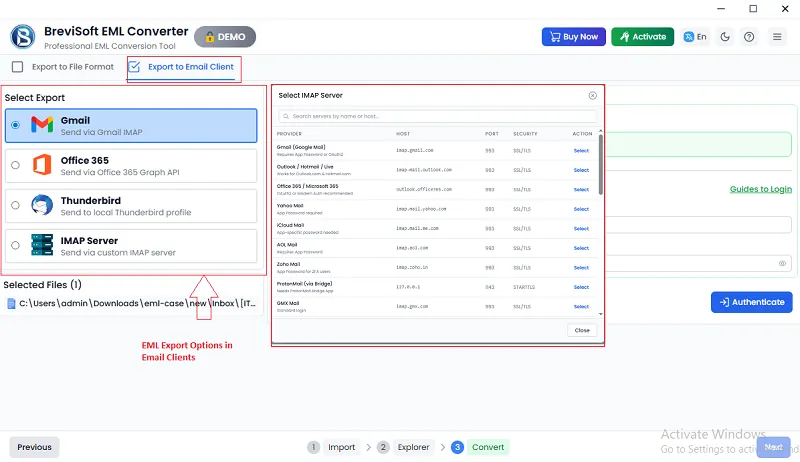
- Import or Upload EML Files to Cloud and Webmail Accounts such as Gmail, Office 365, and IMAP Servers
Common Scenarios Where EML Converter Tool Helps Manage EML Email Data
The BreviSoft EML Converter is helpful when users need to transfer their emails from one email application to another. Many email programs such as Thunderbird or Windows Mail store messages in EML format, but other platforms may not support this format directly. In such situations, converting EML files into formats like PST, MBOX, or PDF allows users to open and manage their emails in different applications. The conversion process keeps the original email content, attachments, and folder structure unchanged, ensuring that important data is safely moved to the new email environment.
Users often need to store copies of their important emails for long-term access, documentation, or record-keeping. The Brevi Software EML Converter tool helps transform EML files into widely used formats such as PDF, DOC, or TXT, which are easier to store and access later. This is especially useful for businesses that must maintain email records for compliance or internal reference. By converting EML files into these formats, users can organize and preserve their emails in a secure archive that can be opened even without an email client.
As more users adopt cloud email platforms, many need to transfer their existing email data to services such as Gmail, Office 365, or other IMAP-based accounts. Since these platforms may not always accept direct EML file uploads, an EML Converter tool becomes useful for preparing the data for migration. The BreviSoft EML Converter can convert EML files into compatible formats or help upload them to cloud accounts. This allows users to move their emails smoothly while keeping message details, attachments, and folder organization intact.
Explore Powerful Features That Make EML Conversion Faster and Safer

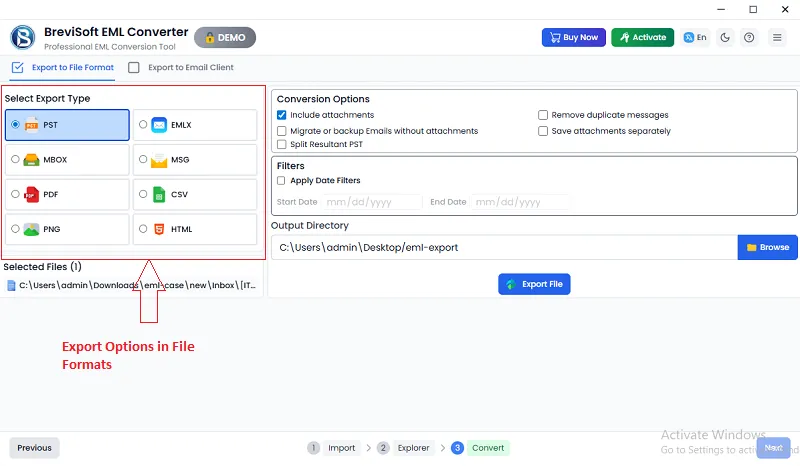
A powerful EML Converter provides the flexibility to convert EML files into several popular formats such as PST, MBOX, MSG, PDF, HTML, TXT, and DOC. This feature makes it easier for users to access their email data across different platforms and applications. By converting EML files into widely supported formats, users can store, share, or migrate their emails without compatibility issues.

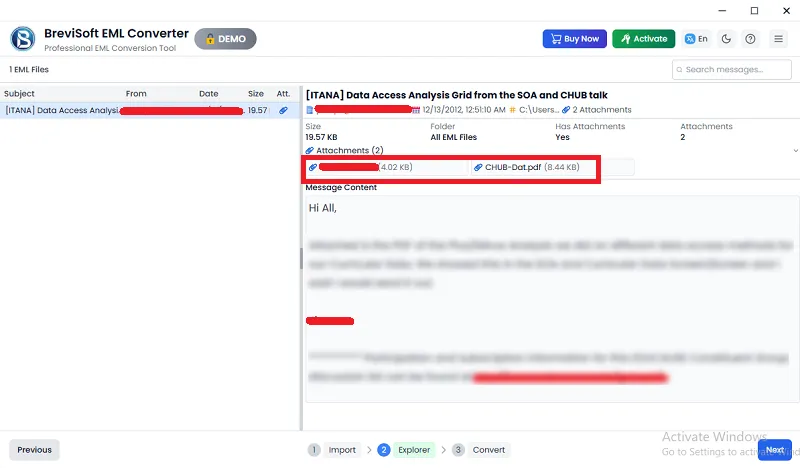
The EML File Conversion software includes a preview option that lets users review EML file content before starting the conversion. This feature allows users to check important details such as sender information, subject, attachments, and message content. By verifying emails in advance, users can ensure that the correct files are selected for conversion and avoid unnecessary processing of unwanted messages.

BreviSoft EML Converter wizard provides smart filtering options that help users convert only the emails they actually need. Users can apply filters based on date range, subject line, sender details, or specific folders. This feature is useful for professionals who want to extract selected emails for reporting, archiving, or migration purposes. It helps reduce processing time and keeps the converted data well organized.

During the conversion process, the EML Exporter software carefully maintains all email elements including attachments, formatting, header information, and metadata. This ensures that the converted files look exactly like the original emails. Maintaining the folder hierarchy and message details is especially important for organizations that require accurate email records for documentation or business communication.

The BreviSoft EML File Converter tool is designed with an easy-to-use interface that allows both technical and non-technical users to perform conversions without difficulty. Users can easily load EML files, choose the output format, and start the conversion with a few simple steps. The simplified design reduces complexity and improves the overall user experience.

Brevi Software provides a modern EML Converter Tool that supports migration of EML files to cloud-based email platforms. Users can upload or transfer their email data to services such as Gmail, Office 365, and other IMAP-supported accounts. This feature helps users move their emails to modern cloud environments while preserving the complete mailbox structure and message details.

The BreviSoft EML Converter tool allows users to convert a large number of EML files in a single process. Instead of converting emails individually, users can select an entire folder containing multiple EML messages and process them together. This feature saves time and simplifies email management for both personal users and organizations. The software efficiently handles large datasets while keeping the original email structure and formatting intact during the conversion process
EML files are commonly used by several email applications such as Thunderbird, Windows Live Mail, and other email clients. The BreviSoft EML Converter tool supports files created by different email platforms, making it easier for users to manage and convert their email data regardless of the original source. This compatibility ensures smooth migration between email systems.

Data safety is an important aspect of any email conversion process. The EML File Exporter tool ensures that users’ email data remains protected during the entire operation. The software performs the conversion locally without altering the original files, which helps maintain data confidentiality and prevents accidental loss of important information.

The EML Conversion software is built with an efficient conversion engine that processes EML files quickly and accurately. Even when dealing with large volumes of email data, the tool performs the conversion smoothly without affecting system performance. This allows users to complete email migration or backup tasks in less time while maintaining high reliability.
Discover why BreviSoft EML Converter is the smart choice for secure conversion with high accuracy
One of the main reasons users choose the EML File Exporter tool is to move their emails from one email platform to another without difficulty. Many email applications store messages in EML format, but other platforms may require different formats to access the data. An EML converter makes this process easier by transforming email files into compatible formats that can be imported into various email clients or services. This helps users transfer their email data smoothly while keeping messages, attachments, and folder structures organized.
The BreviSoft EML Converter software provides flexibility by allowing users to convert EML files into several widely used file formats. This feature is useful for individuals and organizations that need to open or share emails in different environments. By converting emails into formats such as PDF, PST, MBOX, or text-based files, users can access their messages without depending on a specific email application. It also helps in creating readable copies of important emails that can be stored or shared easily.
Another important reason to use the BreviSoft EML File Converter tool is its ability to preserve the complete structure of the original email. During the conversion process, the software maintains email components such as attachments, formatting, header details, and metadata. This ensures that the converted files remain accurate and readable. Preserving data integrity is especially valuable for business communication, record keeping, and situations where maintaining the original information is essential.
Handling a large number of email files manually can be time-consuming and inefficient. The EML Converter tool solves this problem by allowing users to process multiple EML files at once. Instead of converting each email separately, users can select entire folders and convert them in a single operation. This feature is particularly helpful for businesses or professionals who need to manage large email archives, making the overall process faster and more efficient.
Explore the key specifications and system requirements of this software.
Demo Limitation
Limitations
The trial version allows users to convert a limited number of EML files per folder, helping evaluate the software features and performance before upgrading to the full version.
System Specifications
Hard Disk Space
1000 MB of free hard disk space required
RAM
4 GB is recommended
Processor
Intel®Core™ 2 Duo CPUE 4600@ 2.40GHz 2.39GHz
Application
Pre-Requisites
Run the tool as Standard/Guest User without asking for admin privilege:
Supported Editions
FAQs
Please Disable Anti-Virus Temporarily / Allow access (Whitelist) from Anti-Virus Settings for proper working of the software.
Please avoid sources from NAS, SAN, Network or Shared Drive. Source file should be on migration machine to perform successful migration.
Electronic Delivery
Our delivery process is completely automated. Once your payment is confirmed, an email will be sent to you within a few minutes containing the download link and your activation key.
Review the differences between the Free and Full EML Exporter to understand the limits, advantages, and complete functionality.
| Features | Demo Version | Full Version |
|---|---|---|
| Bulk Conversion of EML Files | ||
| Supports EML File Format | ||
| Multiple Output Format Options | ||
| Compatible with All EML-Based Email Clients | ||
| Works on Windows 11 and Earlier Versions | ||
| EML File Conversion Limit | Up to 50 items per folder | Unlimited |
| 24/7 Technical Assistance & Secure Processing | ||
| Cost | Free | $29 |
A highly rated EML conversion solution trusted by users worldwide.

Software Informer BreviSoft For EML Converter has received positive attention on Software Informer for its reliable performance and simple conversion process. The platform highlights the software’s ability to handle EML files efficiently while maintaining the original email structure and attachments. Users appreciate the tool for its straightforward interface and dependable results when converting or migrating email data.

Softonic features BreviSoft EML Converter as a useful solution for users looking to manage and convert EML files easily. Reviews on the platform emphasize the software’s smooth functionality, fast processing speed, and compatibility with multiple email formats. It is often recommended for individuals and businesses seeking a convenient way to convert email data.

SoftwareSuggest recognizes BreviSoft EML Conversion as a practical email conversion tool suitable for both personal and professional use. The platform highlights its advanced conversion options and user-friendly design. Many reviewers mention that the software simplifies email migration tasks and helps users manage large collections of EML files more effectively.

CNET BreviSoft EML File Converter has also been listed on CNET, where it is noted for its efficient email conversion capabilities and secure data processing. The platform showcases the software as a helpful solution for converting EML files into multiple formats while keeping email content and attachments intact during the process.
Yes, the tool can process EML files and may also support EMLX files depending on the selected conversion option.
Yes, after conversion, the output files can be easily imported or opened in Mozilla Thunderbird and other supported email clients.
The full version allows users to convert unlimited EML files, while the demo version may have some limitations.
After conversion, users can open the output files using the supported email client or application based on the selected format.
Yes, the tool offers selective conversion options that allow users to choose specific EML files or folders.
Yes, the software allows users to migrate or upload EML emails to supported email platforms and cloud-based accounts.
BreviSoft EML Converter Tool – Verified Purchase Reviews
I used the BreviSoft EML Converter to migrate several folders of archived emails for our company. The software worked smoothly and converted all messages with attachments without any data loss. The interface was simple to understand, which made the whole process fast and stress-free.
Our organization needed a reliable way to convert EML files into other formats for documentation purposes. BreviSoft EML Converter handled the task efficiently and preserved the email formatting perfectly. I also appreciated how quickly the software processed large numbers of files
I was searching for a dependable tool to transfer EML emails into another email platform. BreviSoft made the migration process very easy. The software maintained attachments and message details accurately, and the conversion speed was impressive even with multiple files.
BreviSoft EML Converter helped me organize several email archives for a client project. The tool converted files without complications and supported multiple output formats. Its simple workflow and reliable results make it a practical solution for professionals handling email data regularly