Discover the Powerful Features That Set BreviSoft Mail Backup Apart from Other Tools
If you're planning to switch from one email service provider to another, or migrating from Office 365 to Gmail, Yahoo, or any IMAP-based account, BreviSoft Email Backup Wizard is the perfect solution. It allows you to securely export all your emails, attachments, and folders before making the switch, ensuring no data is lost during the transition. This is especially useful for businesses upgrading their email infrastructure or individuals changing service providers for better features or pricing. The tool maintains the original folder structure, so once migrated, you can easily locate and access your important emails without any confusion or disorganization.
Email accounts are vulnerable to accidental deletion, hacking, server crashes, or corruption, which can result in permanent loss of important business or personal communication. Using BreviSoft Email Backup Wizard regularly ensures that your emails are safely stored in secure formats like PST, EML, MSG, MBOX, or PDF on your local system. This proactive approach helps you recover quickly in case of unexpected data loss, server downtime, or account compromise. It's particularly valuable for businesses that rely heavily on email communication and cannot afford to lose critical client correspondence, contracts, or project-related information due to unforeseen technical issues.
Many businesses, especially in legal, financial, and healthcare sectors, are required to maintain email records for compliance and auditing purposes. BreviSoft Email Backup Wizard helps organizations create long-term archives of their email communications in widely accepted formats, making it easier to retrieve specific emails when needed for audits, legal proceedings, or internal reviews. This tool is also useful for companies that want to free up mailbox storage space while still retaining historical email data securely offline, ensuring that important records remain accessible without cluttering the live email server.
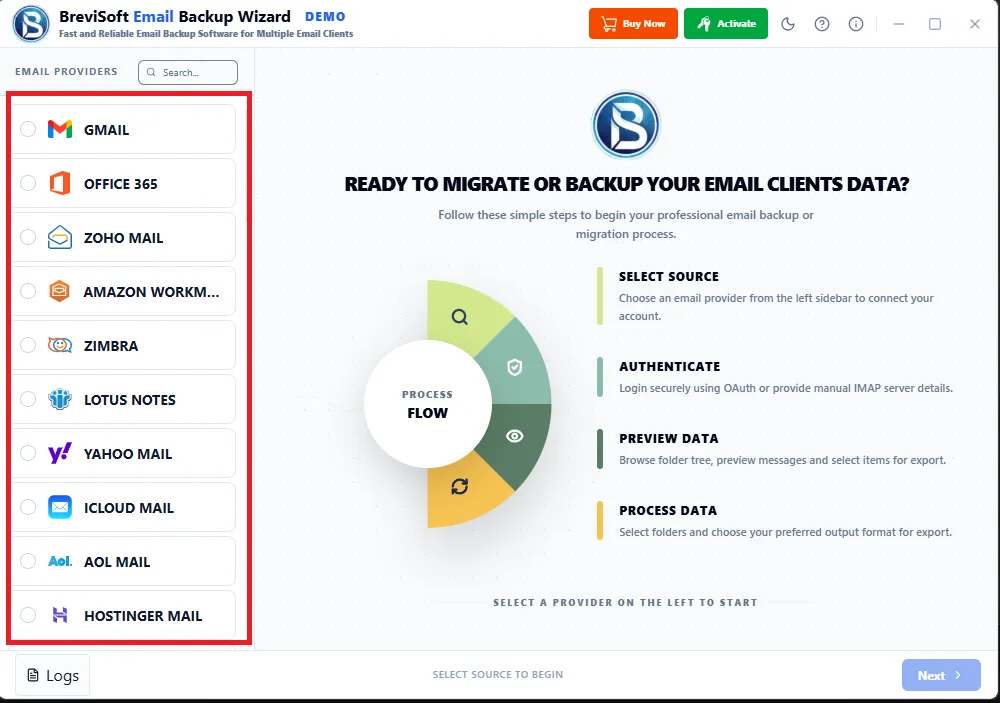
Connect and backup emails from all major IMAP-enabled email services.
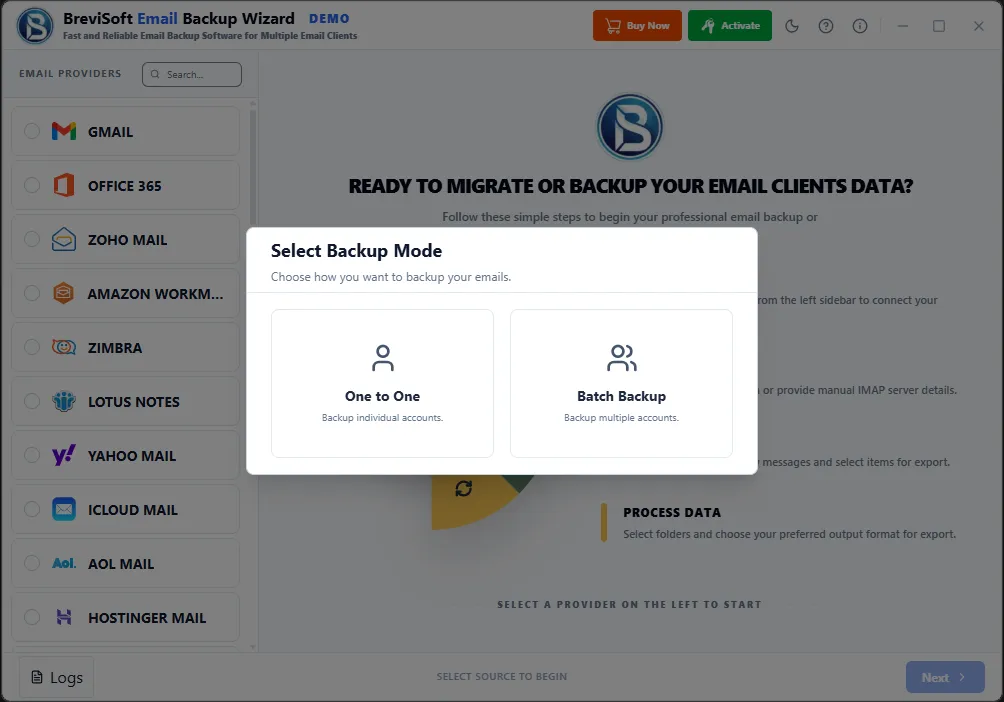
BreviSoft Mailbox Backup Tool allows enterprises to back up multiple email accounts simultaneously, saving significant time and effort for IT teams managing large organizations. Instead of backing up each mailbox individually, administrators can create a batch list of accounts and run the backup process in one go, ensuring consistent and efficient data protection across departments, branches, or client accounts without manual repetition.
This feature ensures that only new or updated emails are backed up during subsequent runs, rather than re-downloading the entire mailbox each time. This significantly reduces backup time, saves bandwidth, and minimizes server load, making it ideal for enterprises with large volumes of daily email communication that require regular, efficient backup cycles.
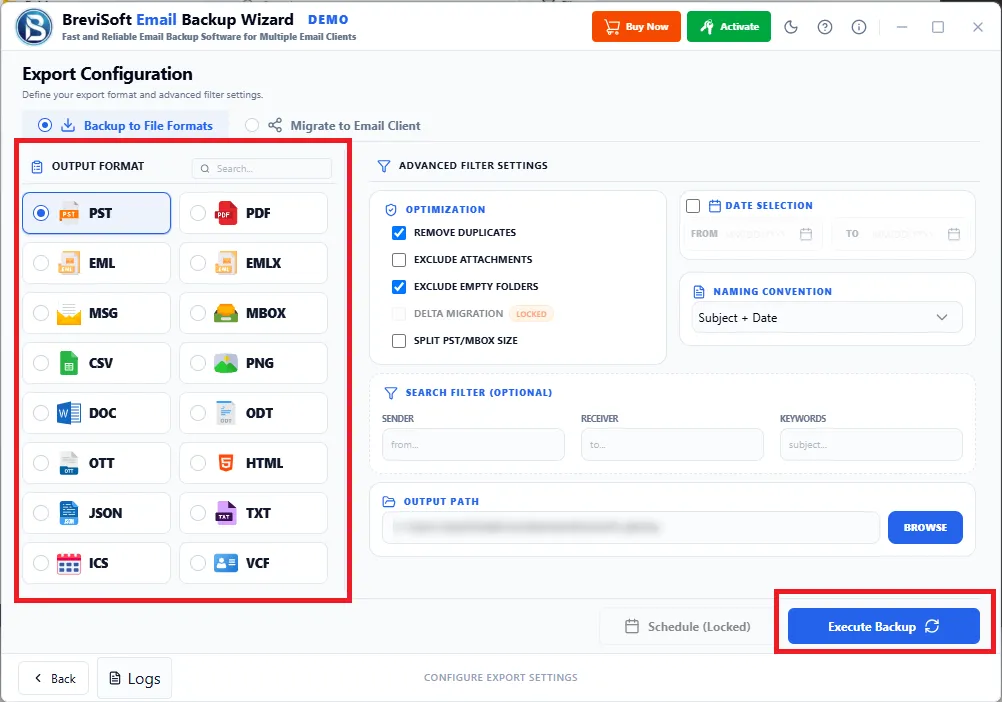
Enterprises often need flexibility in how data is stored and accessed. BreviSoft Email Backup Tool supports exporting emails into PST, EML, MSG, MBOX, and PDF formats, allowing organizations to choose the most suitable format for archiving, legal compliance, cross-platform compatibility, or integration with other enterprise systems and document management tools.
The Webmail Backup software provides advanced filtering capabilities based on date range, sender, recipient, subject, and folder selection. This allows enterprises to back up only relevant data instead of entire mailboxes, helping save storage space and making it easier to retrieve specific business-critical emails during audits, investigations, or compliance reviews.
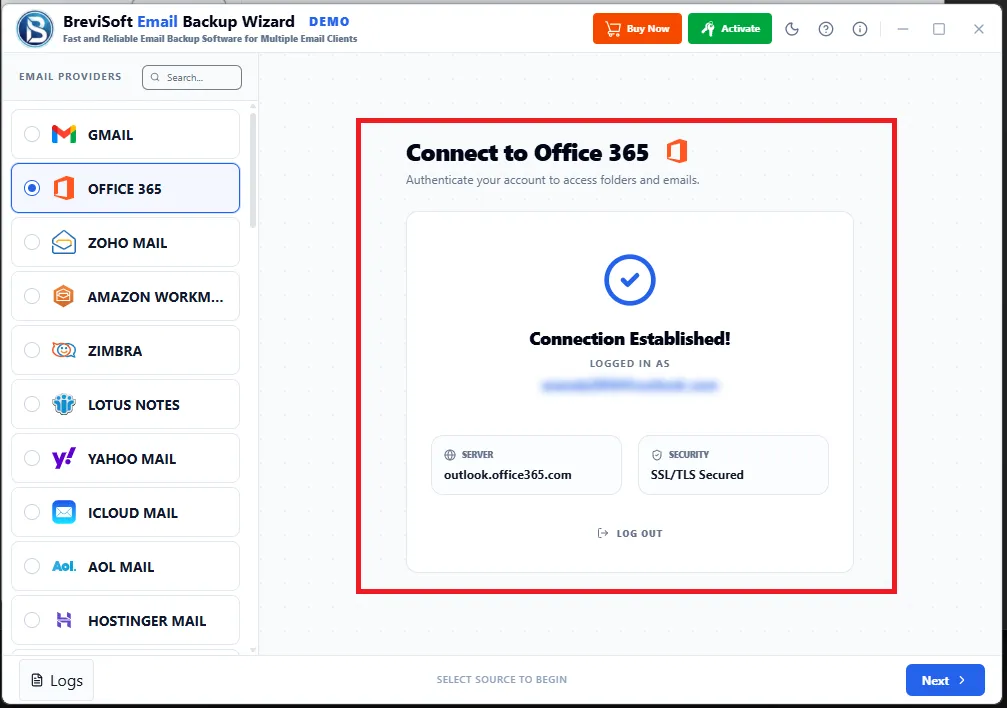
Enterprise data security is a top priority, and BreviSoft ensures secure login through encrypted authentication protocols for all supported email platforms. This protects sensitive business communications during the backup process, preventing unauthorized access and ensuring that confidential information remains safe throughout migration, storage, and retrieval operations.
During backup, the software maintains the original folder hierarchy of mailboxes, including subfolders, labels, and categorized folders. This ensures that once data is backed up or restored, employees and administrators can navigate through emails exactly as they appeared in the original account, without confusion or disorganization.
Designed for organizations with hundreds or thousands of employees, BreviSoft Email Backup Wizard supports managing and backing up multiple user accounts from a centralized dashboard. IT administrators can monitor backup status, schedule jobs, and manage credentials for various departments or client accounts, streamlining enterprise-wide data protection efforts efficiently.
Enterprises can configure automatic backup schedules—daily, weekly, or monthly—eliminating the need for manual intervention. This ensures continuous data protection, reduces the risk of human error, and guarantees that critical business emails are consistently backed up according to organizational policies and compliance requirements.
Unlike many backup tools that impose restrictions on mailbox size, BreviSoft Mailbox Backup Tool is built to handle large enterprise mailboxes without limitations. This makes it suitable for organizations with extensive email histories, large attachments, and high-volume communication, ensuring complete and accurate backup regardless of data size.
For industries like legal, finance, and healthcare, regulatory compliance requires long-term retention of email records. BreviSoft Mail Backup Tool enables enterprises to create secure, easily retrievable archives that support audits, legal discovery, and internal investigations, helping organizations meet industry-specific data retention laws and corporate governance standards effectively.
Source Email Clients (Input)
Gmail, Office 365, Zoho Mail, Thunderbird, Amazon WorkMail, Zimbra, Lotus Notes, Yahoo Mail, iCloud Mail, AOL Mail, Hostinger Mail, ProtonMail, Tutanota, GMX Mail, Mail.com Yandex Mail, Fastmail, Mail.ru, 1&1 IONOS, Rackspace Email, GoDaddy (Workspace), DreamHost, Namecheap Private, Gandi.net, Hetzner, OVHcloud, Telekom (T-Online), Web.de, Posteo, Mailbox.org, Xfinity (Comcast), Spectrum (Charter), Cox Mail, BT Mail, Runbox, EarthLink, Rediffmail, SiteGround, InMotion Hosting, Liquid Web, A2 Hosting, InterServer, JustHost, Exchange Server, Outlook.com, IceWarp, Windows Live Mail, IMAP (Manual)

Destination Email Clients & File Formats
File Formats : PST, PDF, EML, EMLX, MSG, MBOX, CSV, PNG, DOC, ODT, OTT, HTML, JSON, TXT, ICS, VCF
Email Clients : Gmail, Office 365, Zoho Mail, Thunderbird, Amazon WorkMail, Zimbra, Lotus Notes, Yahoo Mail, iCloud Mail AOL Mail, Hostinger Mail, ProtonMail, Tutanota, GMX Mail, Mail.com, Yandex Mail, Fastmail, Mail.ru, 1&1 IONOS, Rackspace Email, GoDaddy (Workspace), DreamHost, Namecheap Private, Gandi.net, Hetzner, OVHcloud, Telekom (T-Online), Web.de, Posteo, Mailbox.org, Xfinity (Comcast), Spectrum (Charter), Cox Mail, BT Mail, Runbox, EarthLink, Rediffmail, SiteGround, InMotion Hosting, Liquid Web, A2 Hosting, InterServer, JustHost, Exchange Server, Outlook.com, IceWarp, Windows Live Mail, IMAP (Manual)

Back up or migrate email from 60+ clients and servers to 60+ Email Clients and 15+ formats — all from one simple, secure tool.
Seamless Backup and Migration for Consumer Webmail Accounts
Whether your inbox lives in Gmail, Yahoo Mail, iCloud Mail, AOL Mail, Outlook.com, GMX Mail, Mail.com, Yandex Mail, Mail.ru, Web.de, or Rediffmail, BreviSoft Email Backup Wizard connects directly and pulls your messages without losing folder structure, attachments, or metadata. It's built for the everyday webmail accounts most people actually use, so switching providers or simply keeping a local backup doesn't mean manually forwarding messages or exporting one folder at a time. Connect your account, choose a destination, and let the wizard handle the rest securely.
Reliable Email Transfer for Business and Enterprise Platforms
Enterprise mailboxes carry higher stakes, and BreviSoft Email Backup Wizard is built to match. It supports Office 365, Zoho Mail, Amazon WorkMail, Zimbra, Lotus Notes, Exchange Server, IceWarp, and Windows Live Mail, preserving folder hierarchies, shared mailboxes, and message integrity throughout the process. Whether you're migrating a department to a new platform or archiving records for compliance, the tool handles enterprise-scale volume without manual exports or IT scripting. It's designed for admins who need a reliable, repeatable process rather than a one-off workaround.
Effortless Email Export from Hosting Provider Mailboxes
Hosted mailboxes from Hostinger Mail, 1&1 IONOS, Rackspace Email, GoDaddy Workspace, DreamHost, Namecheap Private, Gandi.net, Hetzner, OVHcloud, SiteGround, InMotion Hosting, Liquid Web, A2 Hosting, InterServer, and JustHost are all supported natively. If you're moving off a hosting plan, consolidating domains, or just want an offline copy of business email tied to your domain, BreviSoft Mail Backup Tool connects to these providers directly and exports everything intact. No need to dig through cPanel settings or rely on the host's limited export tools.
Safeguard Your Inbox Before Switching ISP or Telecom Providers
ISP-provided email accounts like Xfinity (Comcast), Spectrum (Charter), Cox Mail, BT Mail, EarthLink, and Telekom (T-Online) are notoriously hard to back up once you switch providers or cancel service. BreviSoft Email Backup Tool captures these mailboxes before access disappears, exporting years of messages to a portable format or a new client. It's a practical safeguard for anyone who's ever lost old emails after canceling internet service, and it removes the scramble to save everything manually before a provider switch.
Secure Migration Built for Privacy-Focused Email Providers
ProtonMail, Tutanota, Posteo, Mailbox.org, Runbox, and Fastmail are built around encryption and privacy, which historically has made data portability harder. BreviSoft Email Backup Wizard works within these providers' security models to back up or migrate mail without compromising the protections you chose these services for. Whether you're archiving encrypted mail locally or moving between privacy-focused providers, the process stays secure end to end — no third-party exposure, no compromise on the security guarantees that brought you to these platforms in the first place.
A Universal Fallback for Desktop and Manual IMAP Setups
For Thunderbird and any account configured through manual IMAP setup, BreviSoft Email Backup Wizard connects directly using standard IMAP protocols, meaning virtually any provider not explicitly listed is still reachable. This makes the tool a catch-all safety net — if your provider isn't a named integration, manual IMAP support usually fills the gap. It's ideal for niche or self-hosted email setups, giving you the same backup and migration reliability as the major named clients, without needing a dedicated connector built for your exact provider.
System requirements, supported clients, and key technical details
Trial Limitations
Limitations
Download the FREE BreviSoft Email Backup Tool evaluation version and convert the first 50 emails from your selected mail folder into any supported file format, or migrate them directly to another mail or IMAP account. Once you're satisfied with the results from the free demo, you can purchase the licensed edition of BreviSoft Email Backup Tool to unlock full, unlimited backup and migration.
System Specifications
Hard Disk Space
1000 MB of free hard disk space required
RAM
4 GB is recommended
Processor
Intel®Core™ 2 Duo CPUE 4600@ 2.40GHz 2.39GHz
Application
Pre-Requisites
Run the tool as Standard/Guest User without asking for admin privilege:
Supported Editions
FAQs
Electronic Delivery
Delivery is fully automated. After successful payment confirmation, you will receive an email within a few minutes containing your download link and activation key.
A Secure Way to Back Up Your Emails – Free vs Paid Version
| Features | Demo Version | Full Version |
|---|---|---|
| Connect to 60+ Email Clients & Servers | ||
| Export to 15+ File Formats (PST, PDF, EML, MBOX & more) | ||
| Email-to-Email Direct Migration | ||
| Preserve Folder Structure & Metadata | ||
| Date-Range & Custom Filters | ||
| Incremental Backup (Skip Duplicates) | Fully optimized support | |
| Backup Attachments, Contacts & Calendars | ||
| OAuth 2.0 Secure Authentication | ||
| Windows & macOS Compatibility | ||
| Backup Limit | 50 Emails/Per Folder | Unlimited |
| Priority Technical Support | ||
| Cost | Free | $89 |
Recognized for Excellence with Top Ratings and Trusted by Thousands of Users
CNET BreviSoft Email Backup Wizard is featured on CNET Download, recognized for its clean interface and reliable performance across 50+ email clients and formats.
Software Informer Software Informer rates BreviSoft Mailbox Backup Tool [4.9/5], highlighting its broad client support, secure processing, and consistent backup accuracy.
Softonic Softonic awards BreviSoft Mail Backup Software [4.9/5], praising its intuitive wizard-style workflow for backing up and migrating email safely.
Software Suggest Software Suggest lists BreviSoft Email Backup Tool among top-rated backup tools, with users citing ease of use and dependable format support.
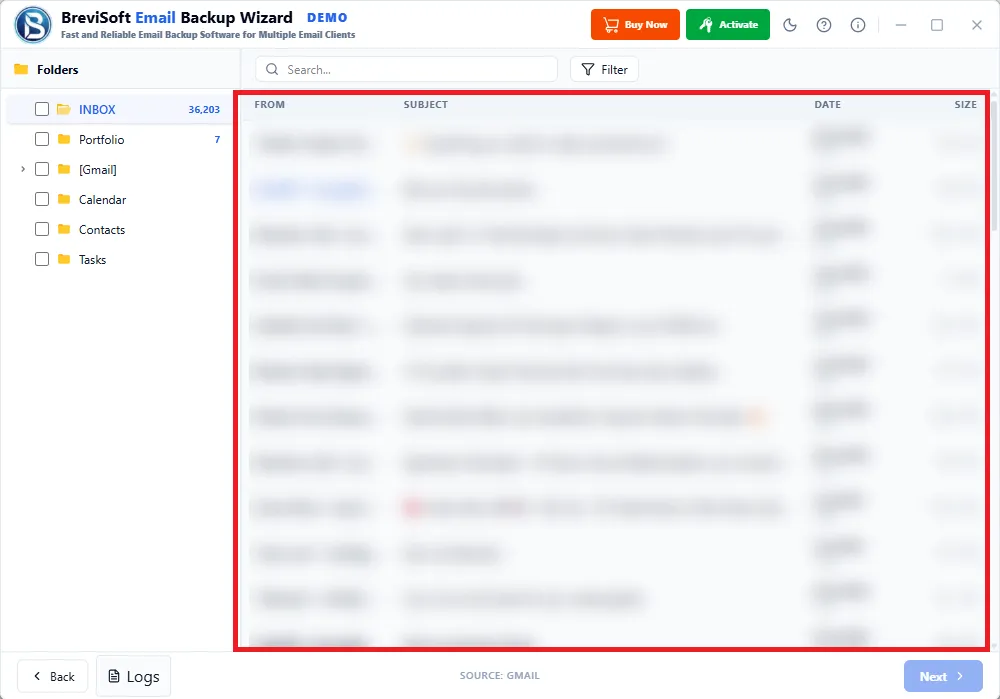
BreviSoft Email Backup Tool is a professional solution that lets you back up emails from multiple email services to your computer or to another email account. It securely saves emails, attachments, contacts, calendars, and other mailbox data while preserving the original folder structure and email properties.
Backing up emails is simple:
The software supports more than 50 popular email services, including Gmail, Microsoft 365, Outlook.com, Yahoo Mail, Thunderbird, Zoho Mail, AOL Mail, ProtonMail, IMAP accounts, and many other business and webmail providers.
Yes. The tool downloads complete emails along with all attachments, embedded images, headers, and metadata, without altering the original content.
Yes. BreviSoft Email Backup Tool lets you export emails into multiple formats, including PST, PDF, EML, EMLX, MSG, MBOX, HTML, TXT, DOC, JSON, CSV, PNG, ICS, and VCF, depending on what your backup needs.
Yes. The incremental backup feature saves only newly received emails after the initial backup, so you avoid duplicate data and cut down on backup time.
Absolutely. The tool keeps your original mailbox hierarchy, email formatting, attachments, sender and recipient information, timestamps, and other metadata intact throughout the backup process.
No. BreviSoft Email Backup Tool is built to handle both small and large mailboxes efficiently. Backup speed mainly depends on your internet connection and system performance.
Yes. Besides saving emails locally, the software also supports email-to-email migration, so you can transfer mailbox data between supported email services without losing any data.
Yes. BreviSoft Email Backup Tool uses secure authentication methods, including OAuth 2.0 where supported. Your login credentials are handled securely, and the backup itself runs locally on your computer.
Yes. A free demo version is available so you can try out the software's features and check compatibility before buying a full license. The trial version does have some export limitations.
If you run into any problems while using the software, reach out to BreviSoft's technical support team. They can help with installation, activation, configuration, and backup-related questions to get you back on track.
Email Backup Tool – Verified Purchase Reviews
Switched my entire team from Zimbra to Office 365 with zero data loss. The wizard made a stressful migration painless. Wish I'd found this tool years ago
Backed up 8 years of Gmail archives to PST before an audit deadline. Fast, accurate, and the folder structure stayed perfectly intact throughout.
Needed to export ProtonMail to PDF for client records. Simple interface, no technical hassle, and my encrypted mail stayed secure the whole time.
Cancelled my old ISP and thought I'd lose 15 years of emails. This tool saved everything to my new Outlook account before the account closed.