Email is an integral component of both personal and business life today. Many users use it as their main email client because of its flexibility, security and is free open source solution – Mozilla Thunderbird. But at times you may want to export your emails from Thunderbird into a more universal and shareable format such as the PDF. This is essential for record-keeping, legal purposes or even just sharing important correspondence with someone to ensure your messages remain readable and accessible across all devices.
This post rolls out a quick and easy process to export Thunderbird emails as PDF, covering the various tools, methods and best practices.
Reason to Convert Thunderbird Emails into PDF
There are many reasons to convert Thunderbird emails to PDF:
- Portability – PDF files open on just about any device, minus the email software.
- Legal and Compliance – Numerous industries mandate emails be stored in a non-editable format for examinations or legal retrieval.
- PDFs ensure all future readers access and view the file exactly as it appeared the day you created it.
- Shareability — You can easily share PDF files with colleagues, clients or legal entities without changing the email format and objects.
It also keeps everything you have got including content, attachments, formatting and metadata intact, so there is nothing you miss out on your important emails.
Approach to Convert Thunderbird Emails into PDF
Methods To Export Thunderbird Emails to PDF There are few different methods available which allows you to export thunderbird emails to pdf as per users convenience.
Manual Method Using Print Option to Export Thunderbird Emails to PDF
Thunderbird has a built-in printing tool that enables you to export emails as PDF:
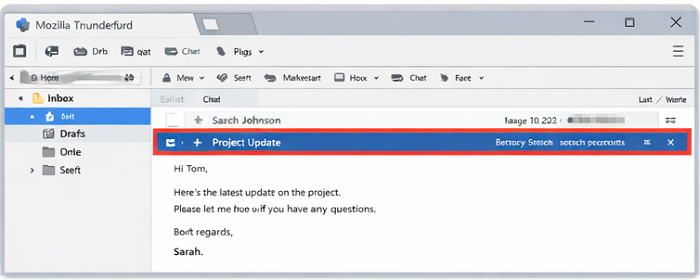
- Launch Mozilla Thunderbird and click on the email that you want to be converted.
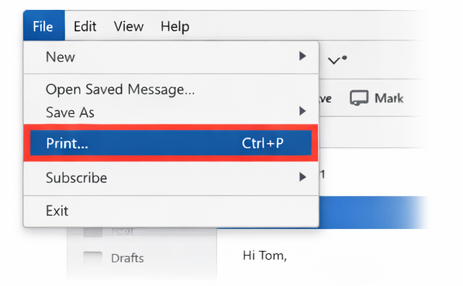
- Select File > Print or hit Ctrl + P.
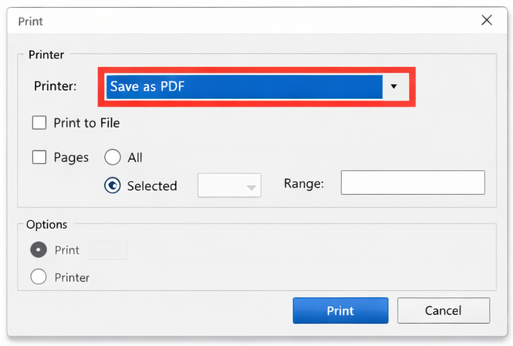
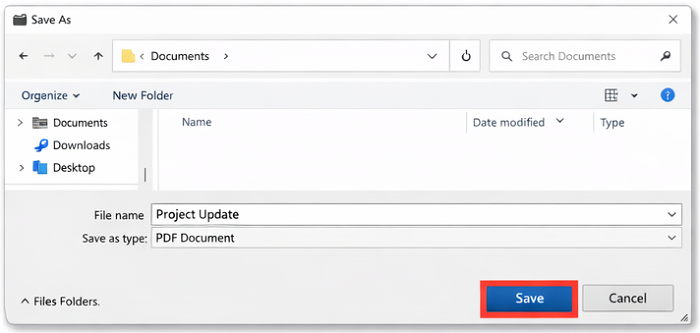
- Select “Save as PDF” from the printer dropdown options in the print dialog.
- Choose the destination folder and save the file
Pros:
- No additional software required.
- Simple for a handful of messages.
Cons:
- Time-consuming for multiple emails.
- Attachments may not be saved automatically
Using Thunderbird Add-ons to Convert Emails to PDF
A few Thunderbird add-ons exist to streamline this process:
– ImportExportTools NG — An extension that lets you batch export emails to PDF, EML or HTML formats.
- You can install the add-on from Thunderbird’s Add-ons Manager.
- Make sure to right-click the email folder that you want to export.
- Choose ImportExportTools NG > Export all messages in folder > PDF format.
- Easily navigate to a folder in your machine and click on save
Pros:
- Allows batch conversion.
- Retains email attachments and metadata.
Cons:
- Add-on installation required.
- Your complicated email formatting could be misinterpreted.
Convert Thunderbird Emails to PDF Using Brevi Software
BreviSoft MBOX Converter is a competent and trustworthy tool specially developed for moving email from Thunderbird to PDF effortlessly. The tool maintains attachments, headers, and the original formatting during the conversion process, which keeps all content of emails unchanged. Users can choose to combine all emails into a single PDF, or generate individual PDFs for each email with great convenience for business, legal or archival purposes. If you are someone who has a busy day managing your email data, this software will work in their favor as it is fast, accurate and easy to scale solution that works with all Windows versions. The software can also import MBOX files into a Gmail account directly, if a user wants to do so.
For business or legal purposes where it is essential to be accurate and quick, using professional software to scale up the process is a must.
Thunderbird Email To PDF Converting Best Practices
- **Organize Emails – Group these emails into folders before conversion to make the process easier and avoid missing important messages.
- *Verify Attachments * – Ensure that any attachments are included in the PDF export, when manual methods such editing is used.
- Backup Original Emails – it is good practice to perform a backup of your Thunderbird profile before making bulk conversion.
- Use Batch Tools for Large Mailboxes – For those with hundreds or thousands of emails, add-ons or professional software can save considerable time.
Steps to Export Thunderbird Emails to PDF Using Breiv Softwre
- Run the BreviSoft MBOX Conerter tool and insert your Thunderbird MBOX files or profile.
- Choose the folders or emails that you wish to convert.
- Select PDF as the type of export and make any adjustments you feel need to be made regarding attachments or formatting.
- Choose the destination folder, and hit Convert.
- All chosen emails will be exported as PDF files within few minutes with entire formatting intact.
This approach is particularly helpful for businesses, law firms and individuals with many emails to manage.
Conclusion
There are many users who want to convert Thunderbird emails to PDF for the purpose of secure archiving or sharing. Regardless of if you prefer manual printing, Thunderbird add-on like ImportExportTools NG or professional software such as * BreviSoft Thunderbird to PDF Converter*, the core goal is same —make sure your emails are preserved with all their content and easy to find.
If you only have a handful of emails, methods involving manual means or add-ons work great. However, on an industrial scale, professional software is faster and more reliable, as well as user-friendly. With this guide, you can easily convert Thunderbird emails into PDF files, saving your time and giving you all the admin rights of email data.
Begin converting your Thunderbird emails to PDF today and enjoy a quick, secure, and simple approach for managing email workflow.
FAQs
Ans – With all of this in mind, exporting emails as PDFs makes them shareable, printable and archivable in a secure manner. The PDF format ensures the content, attachments, and formatting of emails are preserved in a way that is suited for business, legal & record-keeping purposes.
Ans – Yes, third-party tools like BreviSoft Thunderbird to PDF Converter can convert multiple emails and even entire folder to PDF format in one click.
Ans – Yes, it retains all the attachments, headers and basic styling of your emails while conversion so that you get the accurate reflection of your email on PDF.
Ans – Depending on what you need—you may want to convert all emails into a single PDF or keep each email as an individual PDF—there will be options available for you.